
Appearance
Talent: bench targets and high performers at risk
Two newer screens of Talent Management answer two questions leaders ask: is the bench behind our critical roles deep enough? and is anyone of our best people about to leave? The older screens (profiles, succession plans, reviews, pools, careers) are in Talent Management. Every Talent screen now carries charts, including the Calibration Log and the Flight Risk Model.
1. What it is and who uses it
| Role | What they do |
|---|---|
| Talent / HR administrator (tenant administrator) | Sets the bench targets, runs the search for high performers at risk, acknowledges and resolves alerts. |
| HR leadership (Report.View) | Reads Bench Targets. Alerts name people, so they are for tenant administrators only. |
2. Before you start
- Installed plugin:
hcm-talent(free tier; needs HCM Foundation and Employee). - Needs data: succession plans with their criticality and successors (for bench targets), and active talent profiles with a rating and a retention risk (for alerts). The talent review's flight and retention risk are used when present.
- Trial data: generate the Talent and Talent links packs in Demo Data.
3. Set up
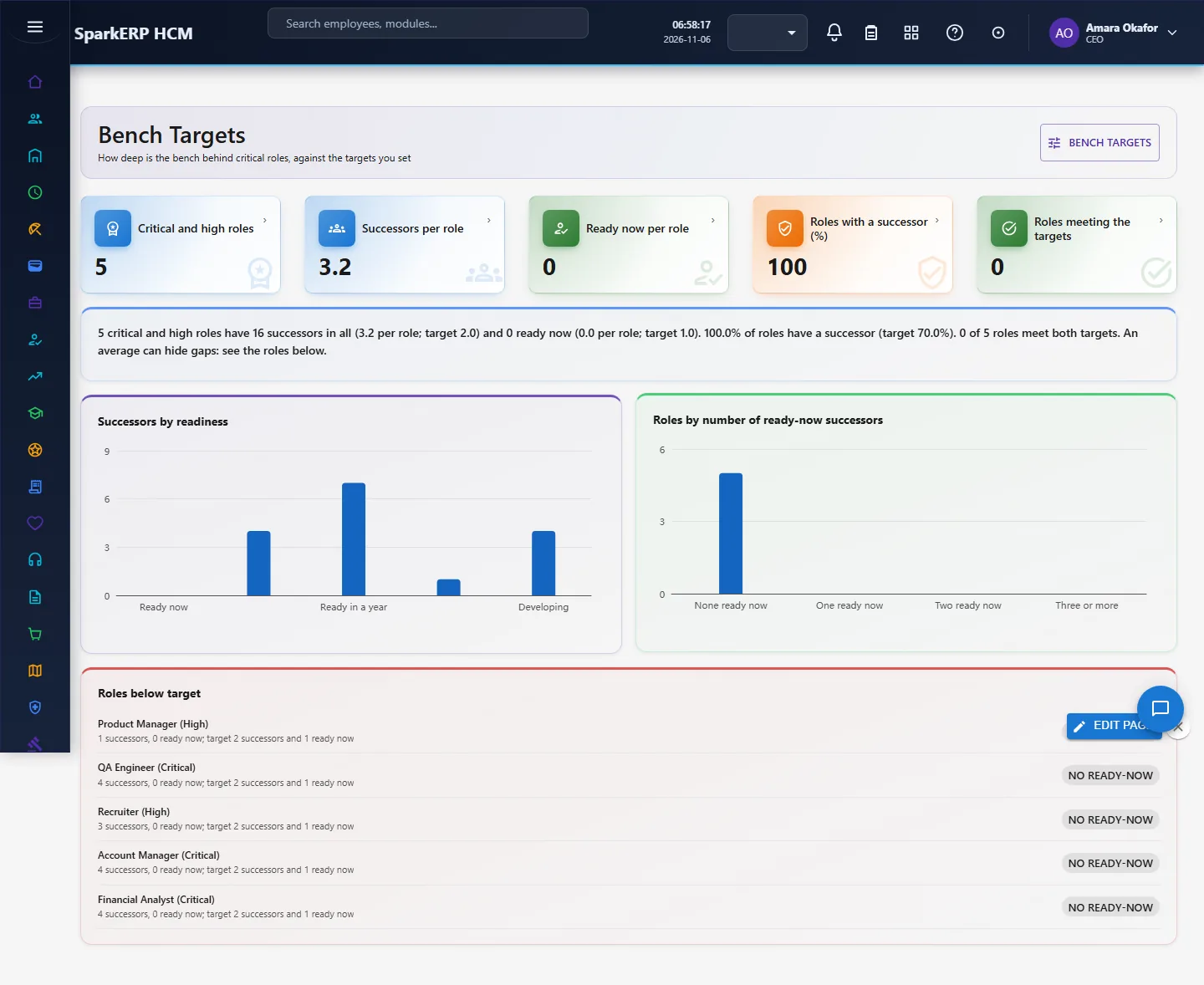
Open Bench Targets and choose Bench targets (administrators). Three numbers are yours to choose, because sources disagree on the right depth: successors per critical role (the usual range is two to three), ready-now successors per role (at least one), and roles with a successor (70% or more is common; some use 80 to 100% for critical roles). The defaults are 2, 1 and 70%. The fourth number, high performer from rating, is the performance rating from which someone counts as a high performer (default 4 on a 5 scale); people in the profile categories high performer, high potential, or both always count.
4. Daily use
4.1 Read the bench
Bench Targets looks at the succession plans of critical and high criticality that are not archived or completed. It shows successors per role, ready-now successors per role, the share of roles with at least one successor, and how many roles meet both targets. An average can hide a gap (one role with five successors and another with none), so the page also draws roles by number of ready-now successors and lists the roles below target with their counts.
4.2 Catch high performers at risk
- Open High Performers at Risk and choose Look for high performers at risk.
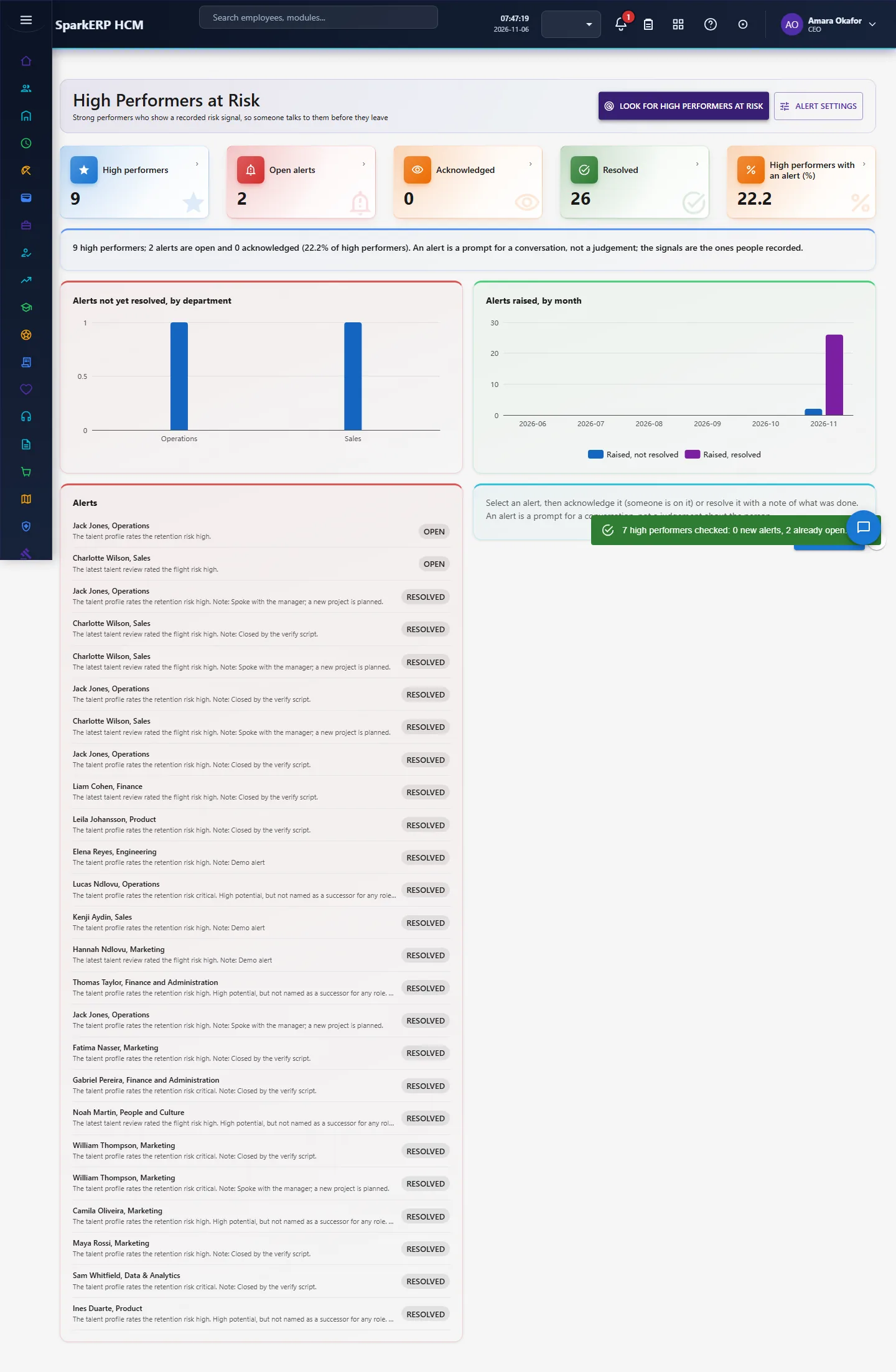
- The search checks every active talent profile of a high performer. It opens an alert when at least one risk signal is recorded: the profile's retention risk is high or critical, or the latest talent review rated the flight risk or the retention risk high. It names each signal, and adds the note "high potential but not named as a successor for any role" only when a risk signal is already there. No alert is opened from context alone, and the search reads no age, gender, health or family information.
- Choose Alert settings (administrators) to have the person's manager emailed when an alert opens: one short email asking for a career and retention conversation, without the signals. It is off until you switch it on, and the email goes through the tenant's own email provider. The search can also run every Monday at 6 AM: an administrator turns on the job "Weekly search for high performers at risk" under Jobs (plugin jobs start switched off).
- A person with an open alert gets no second one. Select an alert, then Acknowledge (someone is on it) or Resolve with a note of what was done. A resolved alert needs that note, so the next person can see what happened.
4.3 Read the Leadership Gap
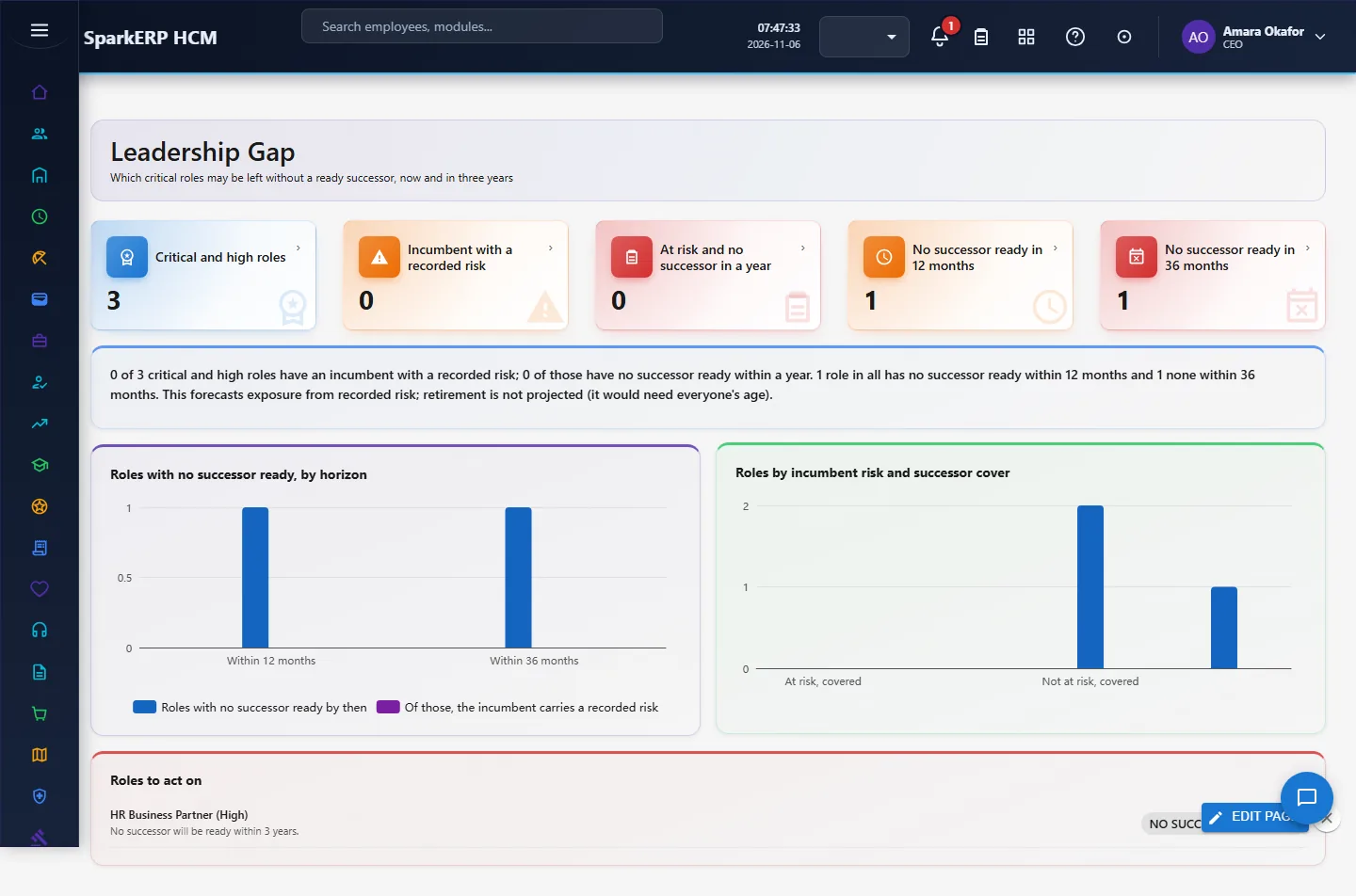
Leadership Gap forecasts where a critical or high role could be left without a successor. A role is exposed when its incumbent carries a recorded risk (profile retention risk, the learned model's high band, or an open alert). For each horizon it counts the roles with no successor who will be ready by then: 12 months counts successors ready now, in 6 months or in a year; 36 months adds those ready in one to three years. The research found no standard formula, so this is our definition; it forecasts exposure from recorded risk, not who will leave, and does not project retirement (it would need everyone's age).
An alert is a prompt for a conversation with the person's manager. It is not a judgement and not a reason to treat the person differently.
5. Charts, reports and exports
| Figure | What it counts |
|---|---|
| Successors per role | Active successor links of critical and high roles divided by those roles. |
| Ready now per role | The same, only successors marked ready now. |
| Roles with a successor (%) | Roles with at least one active successor. |
| Roles meeting the targets | Roles with at least the target successors and the target ready-now. |
| High performers | Active talent profiles in a high-performer category or at or above the rating line. |
| Open, acknowledged, resolved | Alerts by status; the charts show unresolved alerts by department and alerts raised by month. |
| Roles with no successor ready (12 / 36 months) | Critical and high roles with no active successor ready within the horizon. |
| Calibration Log charts | Moves by new nine-box position, and moves per month. |
| Flight Risk Model charts | People by retention risk level and by talent category. |
6. On a phone or tablet
Tiles, charts and lists stack one per row; the targets dialog fits the screen.
7. Rules and limits
- The bench targets are your policy, not a standard: published ranges differ and the page says so.
- The alert uses the risk fields people entered, the review ratings and, when the company has trained one, the learned flight-risk model's high band (the model needs enough leavers to train).
- Time since last promotion is not a signal. The research is mixed (risk is highest right after a promotion and elevated again after long stagnation), and promotion history is held in another module with no service to read it from, so it is left out rather than guessed.
- Not built: alerts by location or role; retirement projection (it would need everyone's age).
8. Troubleshooting
| Symptom | Cause and fix |
|---|---|
| "No critical or high-criticality succession plan exists yet" | Set a plan's criticality to Critical or High. |
| No alert appears after the search | No high performer has a recorded risk signal. Check the profile's risk level and the latest review. |
| "Write a note saying what was done" | Resolving needs a note of at least 5 characters. |
| Forbidden | Your login is not a tenant administrator and lacks Report.View. |