
Appearance
Offboarding Risk
Offboarding tools are judged on how completely and how quickly the leaving steps are done: tasks overdue, assets not returned, access still open after the last day, a final settlement that has not been paid. Offboarding Risk puts those signals for everyone in notice, clearance or settlement on one page, so a late step is seen before the person has gone.
1. Who uses it
| Role | What they do |
|---|---|
| HR offboarding owner | Reads who leaves this week and next, and chases the late owners. |
| IT and facilities leads | See how many overdue tasks sit with them (access, devices) and when the leavers go. |
| Finance | Reads unpaid settlements by age. |
| Line manager | Checks the open tasks of a leaver in their team (handover and knowledge transfer). |
2. Before you start
- Plugin:
hcm-separation(HCM Separation). No extra licence feature. - Access: a tenant administrator, or a login with Report.View.
- Needs: resignations with a last working day, their offboarding checklists, asset return cases and final settlements. In a trial tenant, generate the Separation pack in Demo Data.
3. Set up
There is nothing to switch on. The page counts a resignation as leaving when its status is approved, in notice, exit interview, clearance, final settlement or ready for separation. The last working day is the final one, else the calculated one, else the proposed one. A task is overdue when its due date has passed and it is not done, skipped or cancelled.
4. Daily use
- Open Offboarding Risk in the sidebar under Separation.
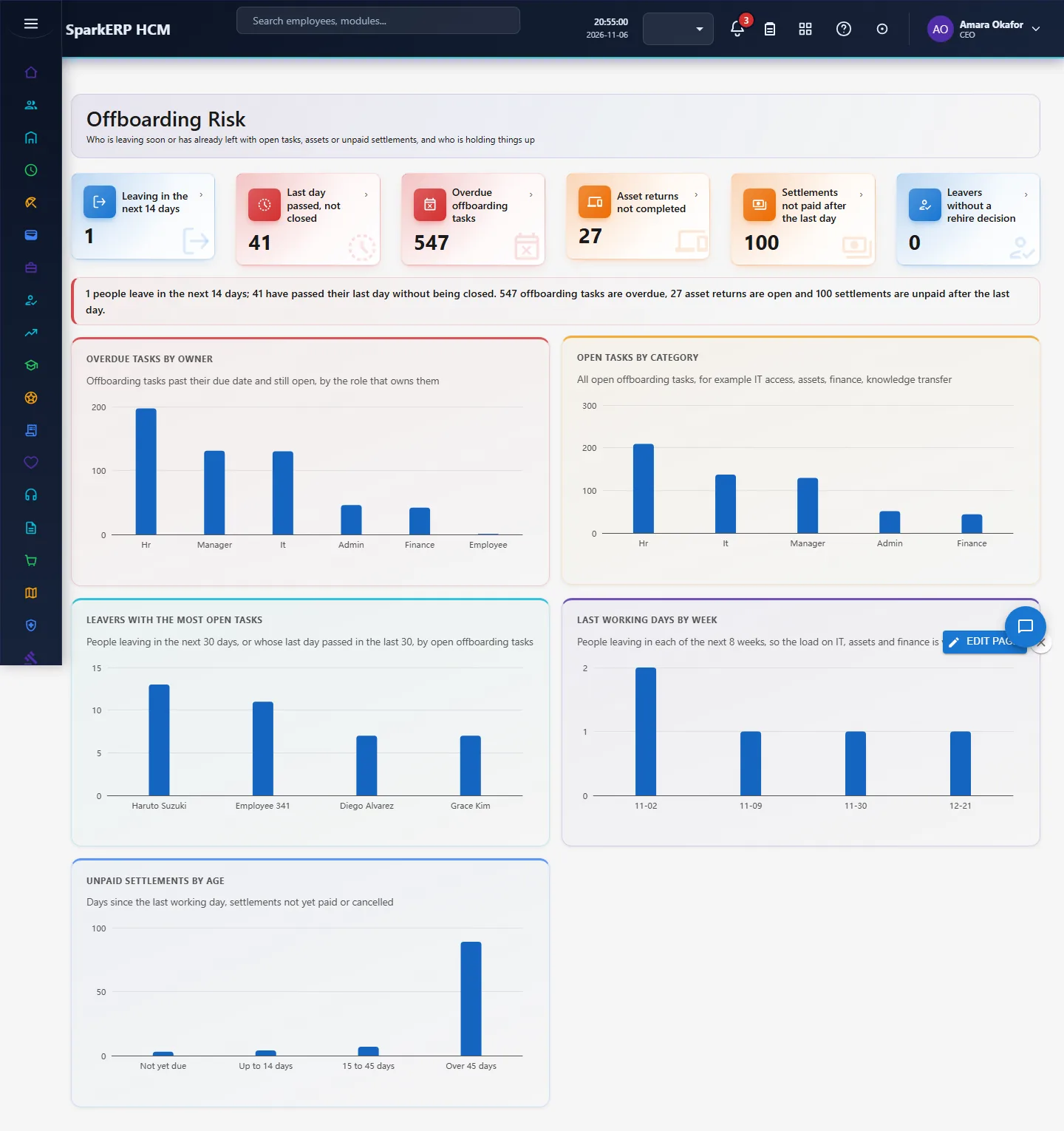
- Read the tiles: leaving in the next 14 days, last day passed but not closed, overdue offboarding tasks, asset returns not completed, settlements not paid after the last day, and leavers with no rehire decision.
- Overdue tasks by owner and Open tasks by category show who and what is holding things up.
- Leavers with the most open tasks names the people (leaving in the next 30 days or gone in the last 30) who have the most still open.
- Last working days by week shows the load of the next 8 weeks; Unpaid settlements by age shows how long settlements have waited.
- Open the matching screen (Offboarding Checklist, Asset Return, Clearance, Final Settlement) and act.
5. Charts, reports and exports
| Figure | What it counts |
|---|---|
| Leaving in the next 14 days | Leaving resignations whose last working day is within 14 days |
| Last day passed, not closed | Leaving resignations whose last working day has passed and which are not yet separated |
| Overdue offboarding tasks | Open tasks past their due date |
| Asset returns not completed | Asset return cases that are not done, cleared or cancelled |
| Settlements not paid | Final settlements after the last working day that are not paid or cancelled |
| Leavers with no rehire decision | Separated leavers whose rehire eligibility is empty |
6. On a phone or tablet
Tiles and charts stack one per row.

7. Rules and limits
- It reads the records. It does not revoke access: access revocation is a task on the checklist, and the page shows when that task is late.
- Access-revocation delay as a number of hours is not measured, because tasks record a due date and completion time but not the hour the person actually left.
- Statutory limits on when a settlement must be paid differ by country and are not applied; the age bands are for orientation only.
- Rehire eligibility is the field on the resignation; the page does not decide it.
8. Troubleshooting
| Symptom | Cause and fix |
|---|---|
| Everything is zero | No resignation is in a leaving status, or the last working day is empty. |
| A leaver is missing from the open tasks chart | Their offboarding checklist has not been created, or the last day is outside the window. |
| "Report.View is required" | The login is not an administrator and lacks the Report view permission. |