
Appearance
New Joiner Watch
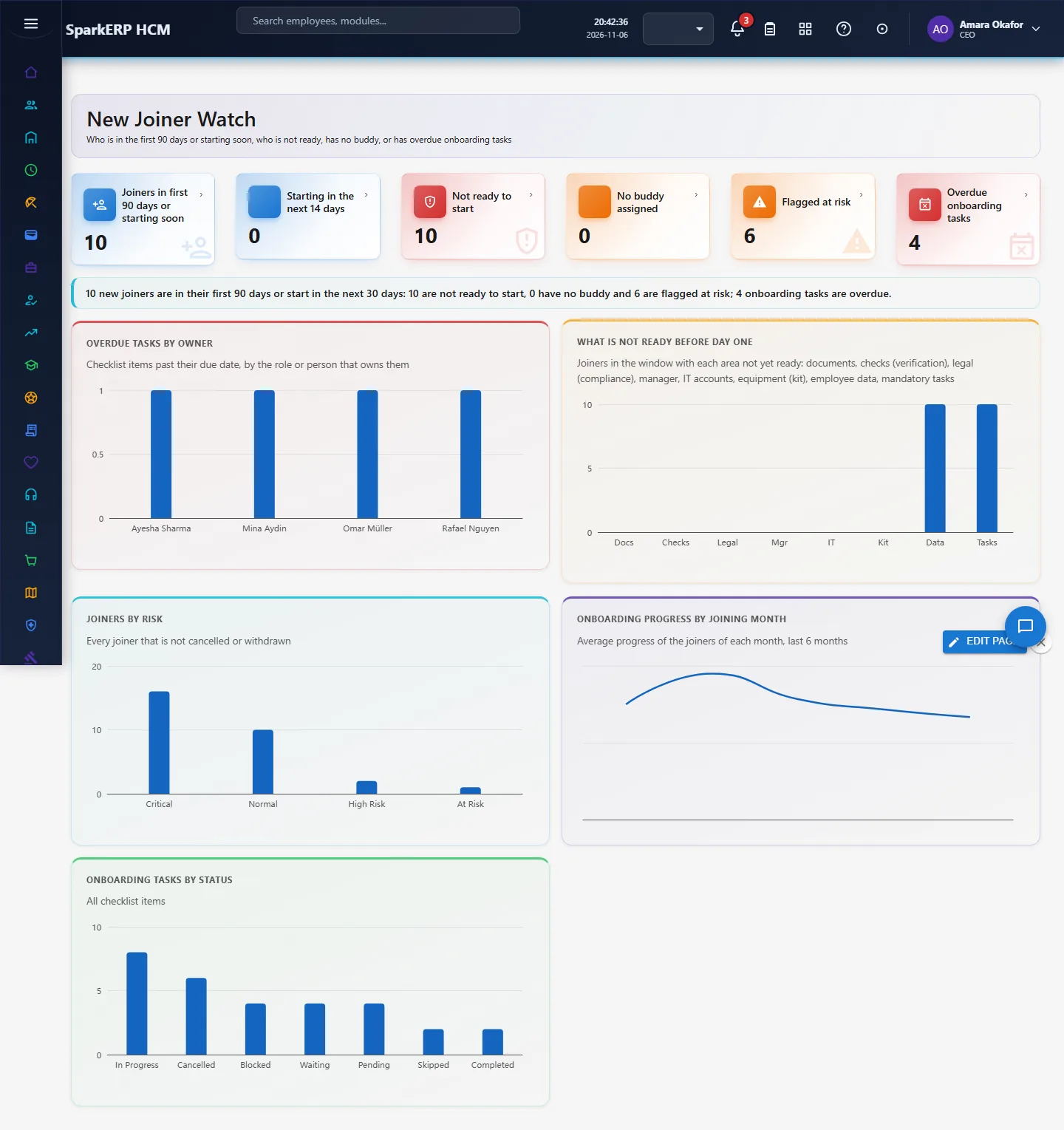
Onboarding dashboards that only show completion rates tell you what happened. The signals that come before an early resignation are different: the new hire is not ready on day one, has no buddy, the manager has not done their tasks, or onboarding tasks are overdue. New Joiner Watch puts those signals for everyone in their first 90 days, or starting in the next 30 days, on one page.
1. Who uses it
| Role | What they do |
|---|---|
| HR onboarding lead | Reads who is not ready and which owners are late, and chases them before the start date. |
| Hiring manager | Checks whether their hire has a buddy and whether their own tasks are done. |
| IT and facilities leads | See how many overdue tasks sit with them (accounts, equipment). |
2. Before you start
- Plugin:
hcm-onboarding(HCM Onboarding). No extra licence feature. - Access: a tenant administrator, or a login with Report.View.
- Needs: new joiners with a joining date, their readiness record and their checklists. In a trial tenant, generate the Onboarding pack in Demo Data.
3. Set up
There is nothing to switch on. The windows are fixed in the page: joiners whose joining date is from 90 days ago to 30 days ahead, and a task is overdue when its due date has passed and it is not completed, skipped or cancelled. Cancelled and withdrawn joiners are left out.
4. Daily use
- Open New Joiner Watch in the sidebar under Onboarding.
- Read the tiles: joiners in the window, starting in the next 14 days, not ready to start, no buddy, flagged at risk, and overdue onboarding tasks.
- Overdue tasks by owner shows who is holding up onboarding; What is not ready before day one shows which area (shown as docs, checks, legal, manager, IT, kit, data and tasks) holds joiners back.
- Joiners by risk and Onboarding progress by joining month show whether newer cohorts are slower than older ones.
- For a late area or owner, open the matching screen (New Joiners, Onboarding Checklists, Account Provisioning, Equipment and Assets) and act.
5. Charts, reports and exports
| Figure | What it counts |
|---|---|
| Not ready to start | Joiners in the window whose readiness is anything other than "ready" |
| No buddy assigned | Joiners in the window with no buddy employee |
| Flagged at risk | Risk status at risk, high risk or critical (set on the joiner record) |
| Overdue onboarding tasks | Checklist items past their due date and still open |
| Overdue tasks by owner | The same items grouped by the owning role, or by the person when no role is set |
| What is not ready | Joiners in the window for whom each readiness area is not ready |
| Progress by joining month | Average progress percent of joiners per month, last 6 months |
6. On a phone or tablet
Tiles and charts stack one per row.

7. Rules and limits
- It shows signals and predicts nothing: there is no attrition score.
- The risk flag is the one set on the joiner record (by HR or the onboarding rules); the page does not recompute it.
- Manager engagement (one-to-ones held in the first month) is not measured because the module does not record one-to-ones.
- 30, 60 and 90 day check-in completion is not shown separately; probation reviews are on the Probation screen.
- Buddy assignment is a field on the joiner; buddy activity is not tracked.
8. Troubleshooting
| Symptom | Cause and fix |
|---|---|
| Everything is zero | No joiner has a joining date in the window; check New Joiners. |
| A joiner is missing | Their status is cancelled or withdrawn, or the joining date is outside the window. |
| "What is not ready" is empty but joiners are not ready | Their readiness record has not been calculated yet; open the joiner to recalculate. |
| "Report.View is required" | The login is not an administrator and lacks the Report view permission. |