
Appearance
Industry pack: Energy and Utilities
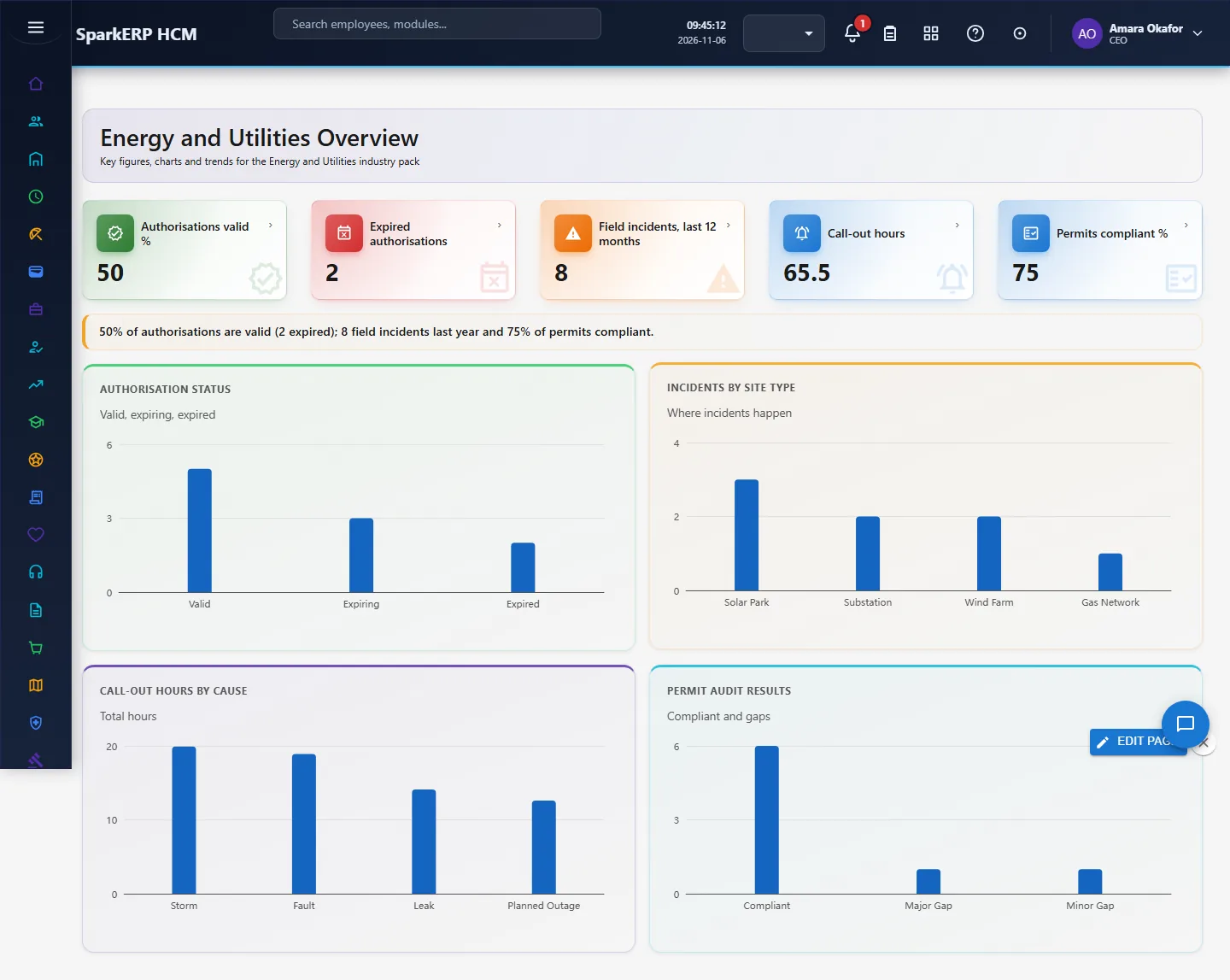
Energy and Utilities adds what a energy and utilities organisation needs on top of HCM Core: competency authorisation, field incident, call-out, permit-to-work check. Every screen carries charts, and the Overview answers the questions this industry asks first. It works with the people already in HCM Core and Employee; it changes nothing there.
1. Who uses it
| Role | What they do |
|---|---|
| Operations / field manager | Checks that crews hold the authorisations for the work. |
| HSE manager | Records field incidents and permit-to-work compliance. |
| HR / training lead | Tracks competency renewals and overtime. |
2. Before you start
- Installed plugin:
hcm-industry-energy-utilities(free tier; needs HCM Foundation and Employee). No licence feature has to be granted. - Access: tenant administrators can use every screen; the Overview needs a tenant administrator or Report.View.
- Trial data: in a trial tenant, generate the Energy and Utilities industry pack in Demo Data: 10 competency authorisation, 8 field incident, 10 call-out, 8 permit-to-work check.
3. Set up
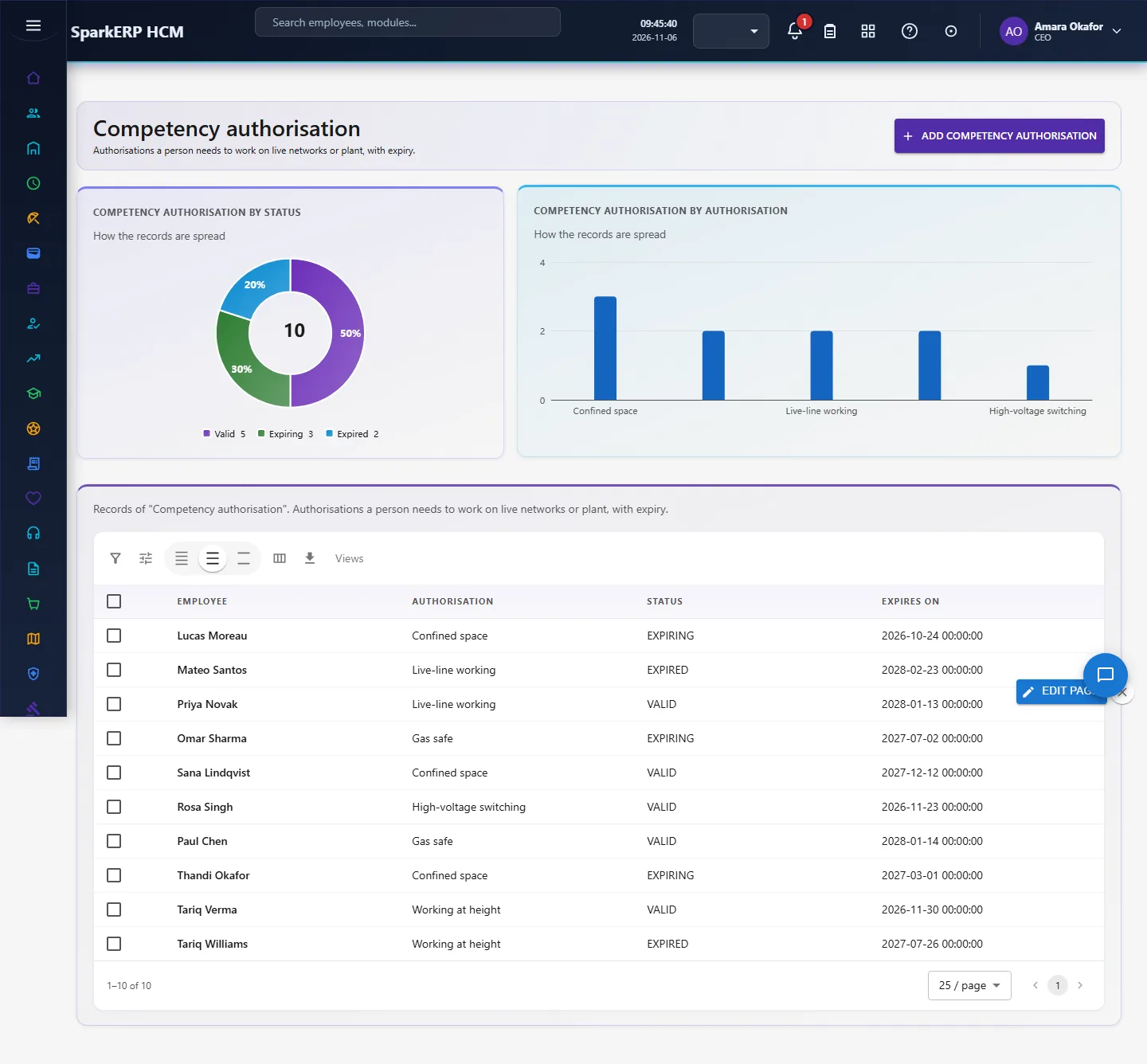
- Open Energy > Competencies and record each crew member's authorisations (high-voltage switching, confined space, gas-safe) with expiry.
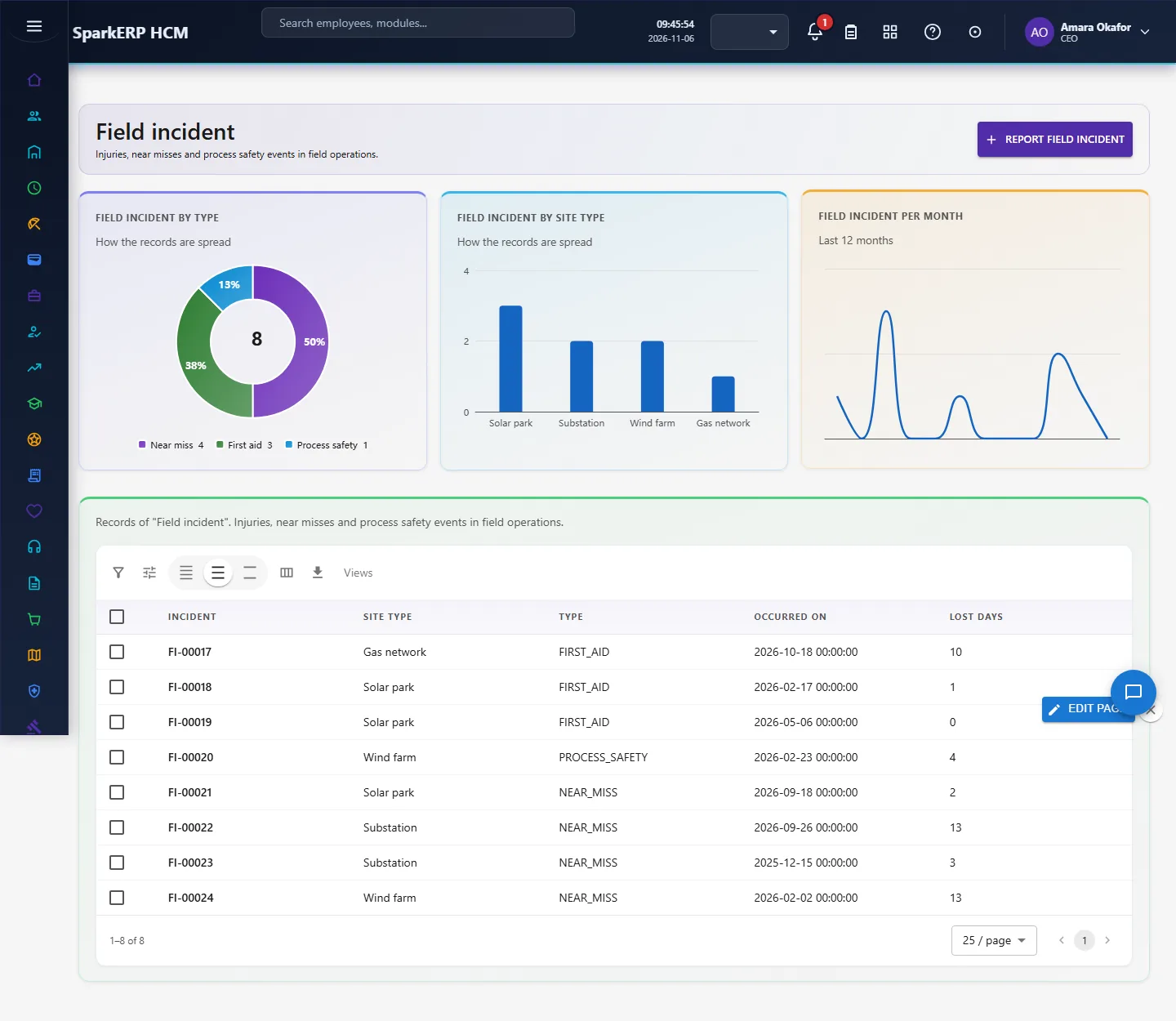
- Record Field Incidents per site type.
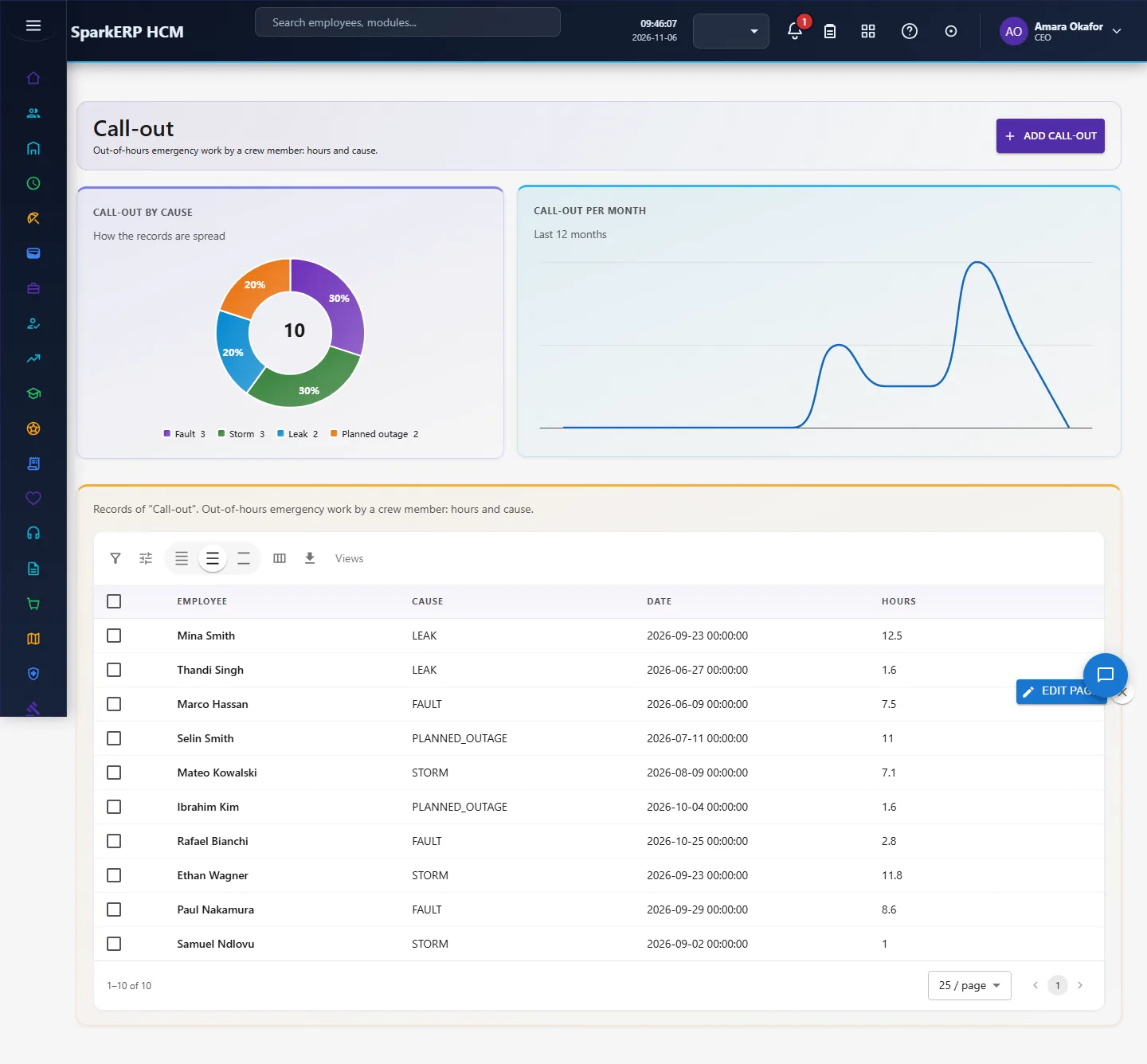
- Record Call-outs (out-of-hours work) with hours.
- Record Permit Checks to track permit-to-work compliance.
4. Daily use
4.1 Competency authorisation
Authorisations a person needs to work on live networks or plant, with expiry. Open Competency authorisation in the sidebar under Industry Pack, Energy and Utilities. Choose Add competency authorisation to add a record, click a row to change or delete it. The fields are: employee, authorisation, status, expires on.
4.2 Field incident
Injuries, near misses and process safety events in field operations. Open Field incident in the sidebar under Industry Pack, Energy and Utilities. Choose Report field incident to add a record, click a row to change or delete it. The fields are: incident, site type, type, occurred on, lost days.
4.3 Call-out
Out-of-hours emergency work by a crew member: hours and cause. Open Call-out in the sidebar under Industry Pack, Energy and Utilities. Choose Add call-out to add a record, click a row to change or delete it. The fields are: employee, cause, date, hours.
4.4 Permit-to-work check
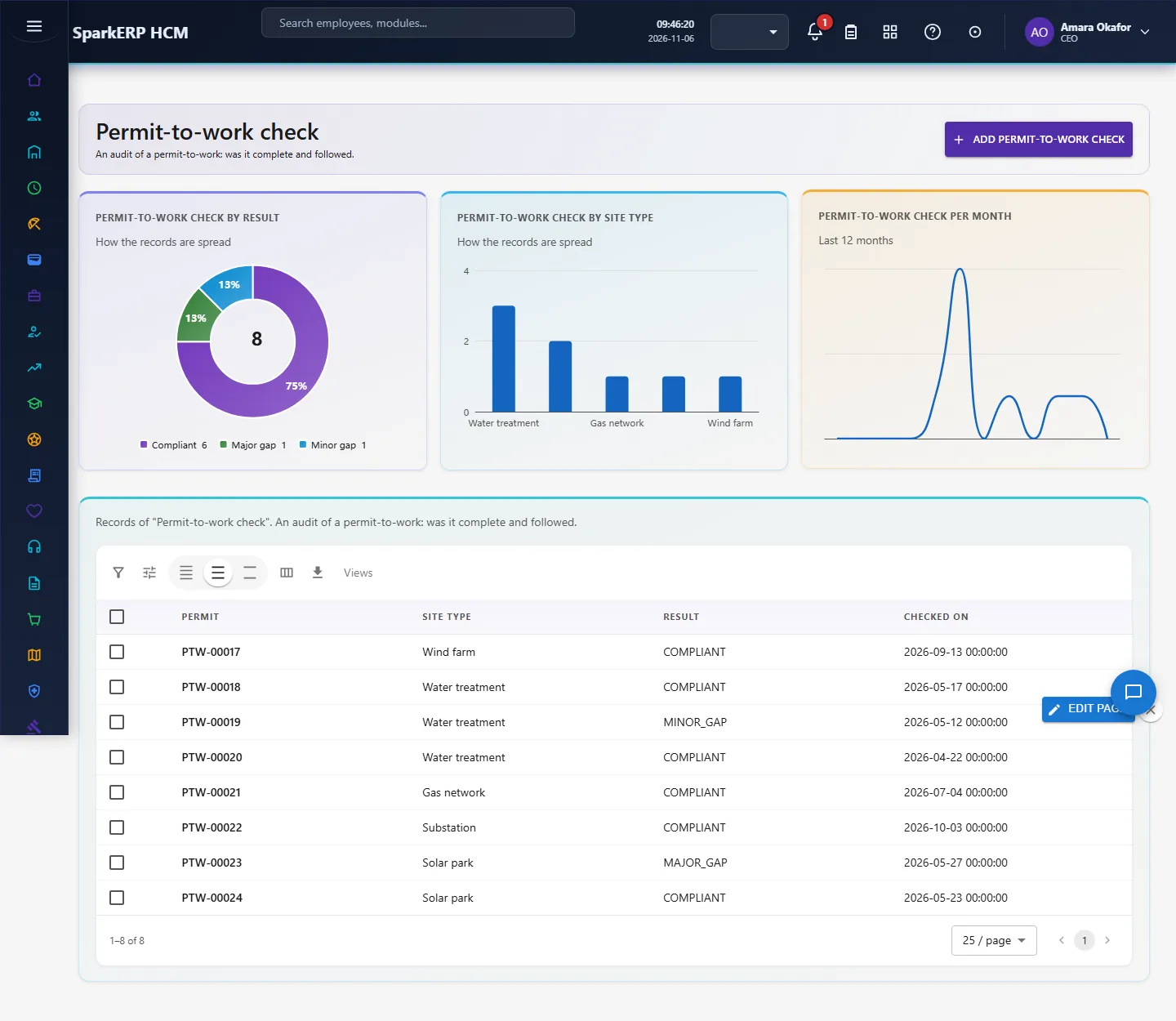
An audit of a permit-to-work: was it complete and followed. Open Permit-to-work check in the sidebar under Industry Pack, Energy and Utilities. Choose Add permit-to-work check to add a record, click a row to change or delete it. The fields are: permit, site type, result, checked on.
5. Charts, reports and exports
| Figure | What it counts |
|---|---|
| Authorisations valid % | |
| Expired authorisations | |
| Field incidents, last 12 months | |
| Call-out hours | |
| Permits compliant % | |
| Authorisation status | Valid, expiring, expired |
| Incidents by site type | Where incidents happen |
| Call-out hours by cause | Total hours |
| Permit audit results | Compliant and gaps |
Every list page also has charts of its own records (by status or category, and a trend), and the platform grid offers search, paging, column choice and export.
6. On a phone or tablet
Every screen works on a phone: tiles, charts and lists stack one per row, and the add and edit dialogs fit the screen.

7. Rules and limits
- Authorisation status is the value you record and is not recomputed from the expiry date.
- Regulated reliability indices (SAIDI/SAIFI) come from network systems, not from HR; the pack covers workforce safety and competence.
- The figures are only as good as the records entered. Benchmarks differ between sources, so none is hard-coded as a target: read the figures against your own history.
8. Troubleshooting
| Symptom | Cause and fix |
|---|---|
| A chart says "Nothing to show yet" | No records yet, or none with the date or category the chart needs. Add records or generate the demo pack. |
| The Overview says forbidden | Your login is not a tenant administrator and lacks Report.View. |
| A screen is missing from the sidebar | The plugin is not installed for this tenant. Ask a platform administrator to install hcm-industry-energy-utilities. |