
Appearance
Recruitment: automated CV screening and cost per hire
This guide covers two newer parts of Recruitment: CV Screening (a transparent score of each open application against the requisition's skills and experience, with a person deciding every one) and Cost per Hire with Recruitment Costs (what it costs to hire one person, by the standard formula). The rest of Recruitment is in Recruitment: from setup to daily use.
1. What it is and who uses it
| Role | What they do |
|---|---|
| Recruiter | Runs screening for a requisition, reads the reasons, and advances, holds or fails each application. |
| Hiring manager | Reads the shortlist the recruiter produced. |
| Recruitment administrator (tenant administrator) | Switches screening on after writing the notice to candidates, sets the thresholds and weights, watches the fairness check, keeps Recruitment Costs and the cost rates. |
| Finance / HR leadership | Reads Cost per Hire. |
2. Before you start
- Installed plugin.
hcm-recruitment(needs HCM Foundation and Employee). It is the free tier, so no licence feature has to be granted. - Access. Running screening needs the Screening create permission (or a tenant administrator); deciding needs Screening decide. Cost per Hire and Recruitment Costs need a tenant administrator or Report.View. Rules and cost rates are changed only by a tenant administrator.
- What screening needs in your data. Each requisition lists its required and preferred skills (with the years asked, if any) and its minimum experience; each candidate has a skills list and total experience. Without them there is nothing to score and every application is sent for a person to review.
- Trial data. In a trial tenant, generate the Recruitment pack in Demo Data: it adds skills to requisitions and candidates, open applications to screen, hires with recruiter hours and itemised costs.
3. Set up
Screening rules. Open CV Screening and choose Screening rules (administrators).
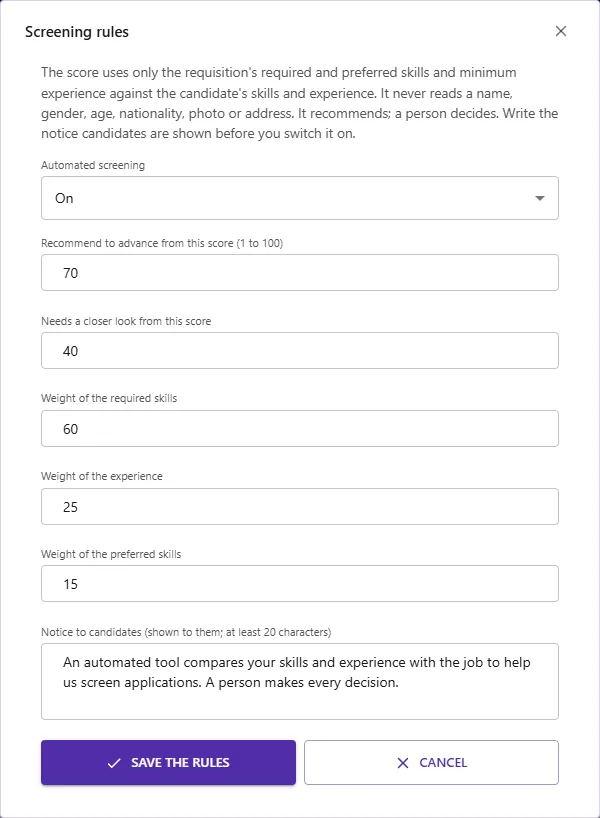
- Automated screening: off until you switch it on. It cannot be switched on without a notice to candidates (at least 20 characters), because people should be told an automated tool helps screen applications and that a person decides. The notice is shown on the screening page; publish the same wording on the careers site.
- Recommend to advance from (default 70) and needs a closer look from (default 40): the score lines.
- Weights of the required skills (60), the experience (25) and the preferred skills (15). Weights are relative; a part the requisition does not use (no preferred skills, no minimum experience) is left out and the rest are re-balanced.
Cost rates. Open Cost per Hire and choose Cost rates: what an hour of recruiter time costs and the overhead percent (space, tools, benefits) added on top. Recruiter hours entered on a hired application are counted at this rate. Leave it 0 to leave recruiter time out.
Itemised costs. Open Recruitment Costs and add each cost: type (advertising, job board, assessment, background check, referral bonus, travel, relocation, event, interviewer time, other), external or internal, amount, currency, date, and optionally the requisition and the source.
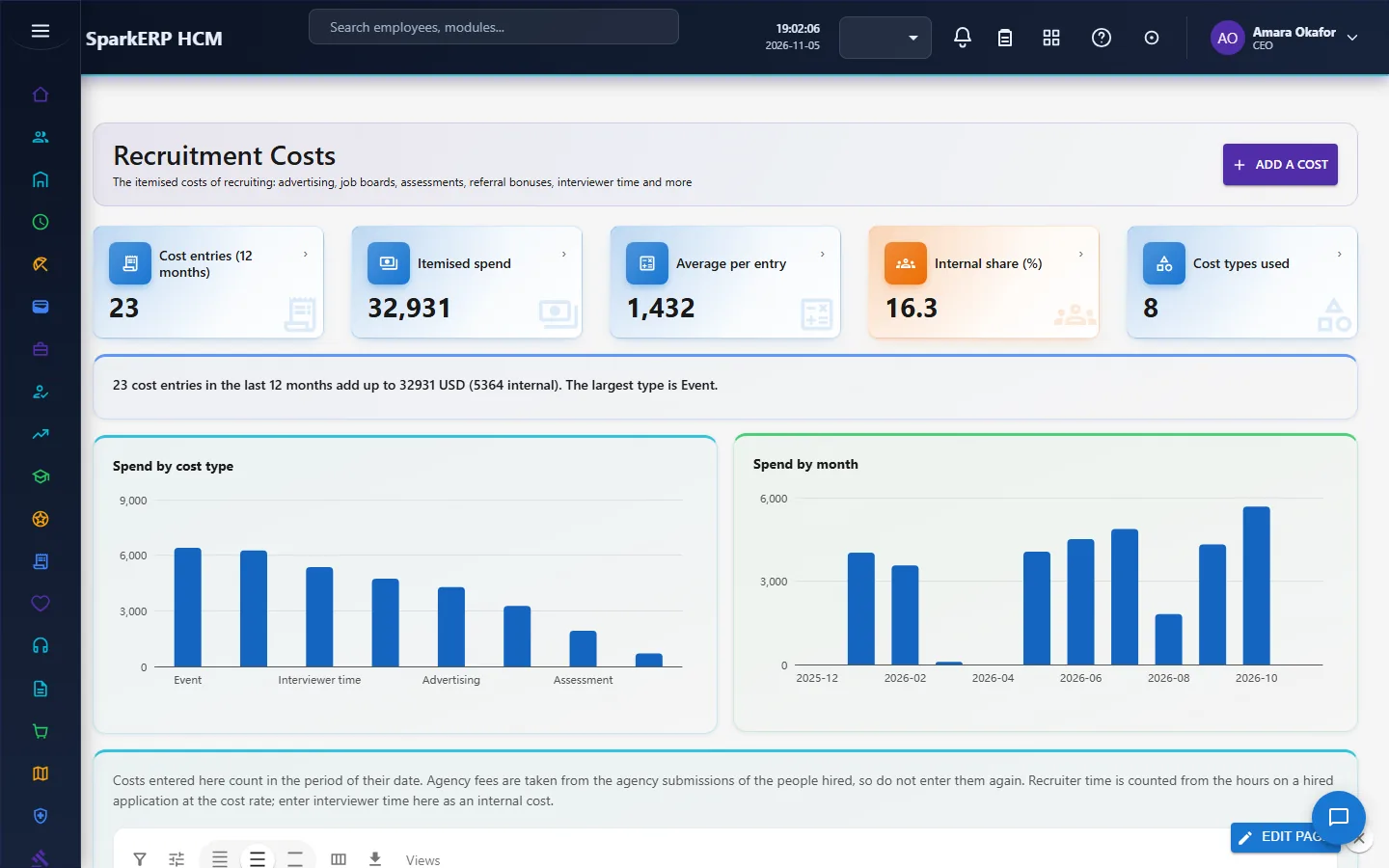
Do not enter agency fees here: they are taken from the agency submissions of the people hired.
4. Daily use
4.1 Screen the applications of a requisition
Open CV Screening and choose a requisition (the list shows how many applications each has).
Choose Screen the open applications. Applications that are new, active or on hold and still at Applied or Screening are scored. Applications a person already decided are left as they are.
The results are ranked by score. Select one to read why this score: each required skill met, partly met (fewer years than asked) or missing, the experience against the minimum, and the preferred skills found.

Decide, as a person:
- Advance moves the application to Shortlisted.
- Hold keeps it for later.
- Fail the screening records a failed screening on the application. The rejection itself, with its reason code and the message to the candidate, is done on the Applications screen. A decision that differs from the recommendation (for example advancing a low match) needs a note, so it can be understood later. Every run and every decision is kept with who made it and when.
4.2 How the score is worked out
The score reads only what the job asks for and what the candidate has: required skills (full credit for a match, half when the years are fewer than asked, none when missing), years of experience against the minimum, and preferred skills. It never reads a name, gender, date of birth, nationality, photo, address or any other personal attribute, and it does not mark experience above the requisition's maximum down (that would act as an age proxy). A missing required skill is always named, and an application with one is never recommended to advance on its own: a person looks first. The system never rejects anyone.
4.3 Watch the fairness check
On the same page, a sentence compares how often each gender group is recommended to advance (the four-fifths rule: the lowest group's rate divided by the highest group's rate; under 80% is a signal). Groups of fewer than 10 screened candidates are left out. The gender is read only for this check, never for a score. A low ratio is not a finding of bias: it is a prompt to review whether the required skills and experience favour one group.
4.4 Read Cost per Hire
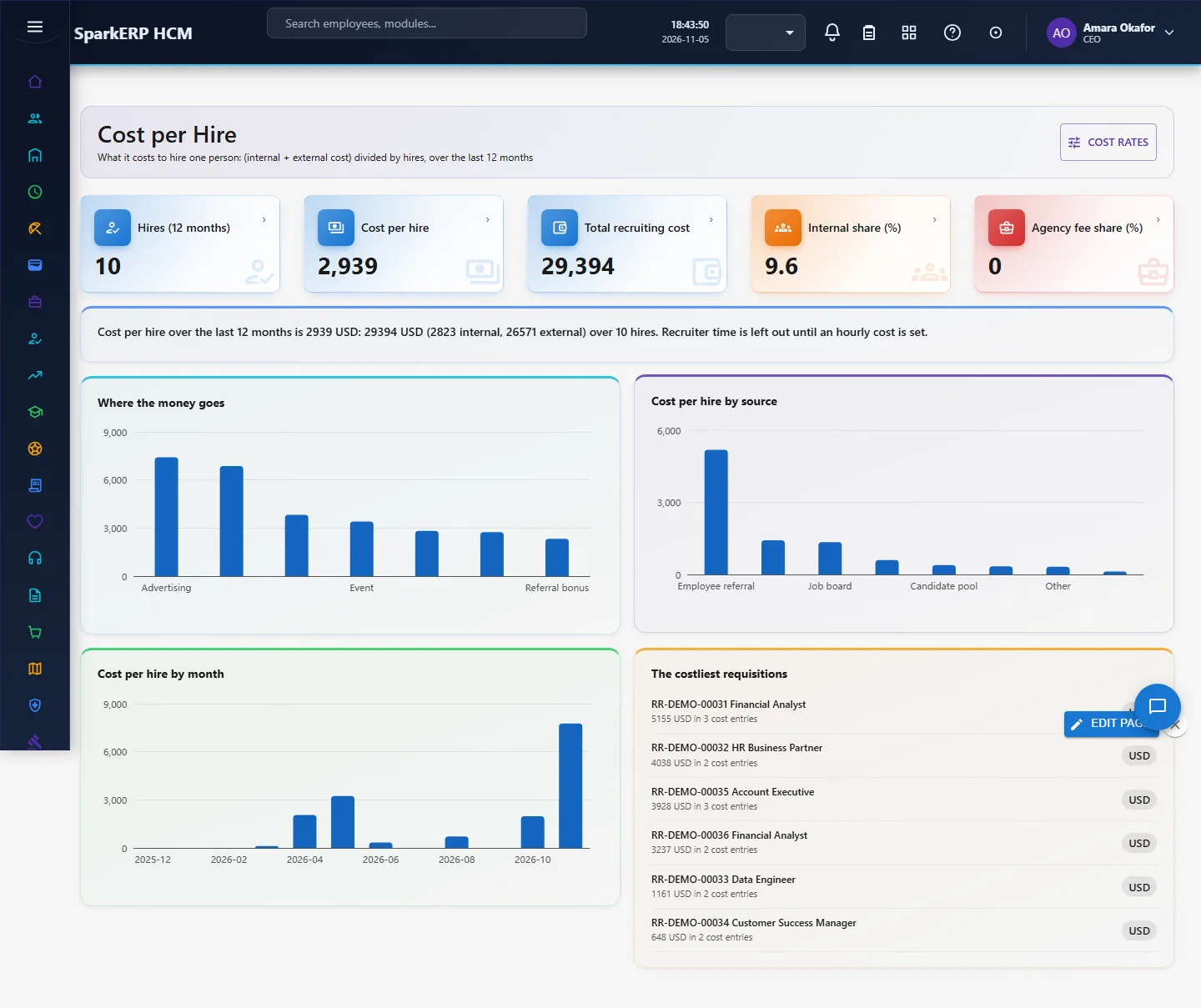
Open Cost per Hire.
5. Charts, reports and exports
| Figure | What it counts |
|---|---|
| Hires (12 months) | Applications with status Hired whose hire date (or, if none, application date) is in the last 12 months. |
| Cost per hire | (Internal cost + external cost) divided by hires, the standard formula (ANSI/SHRM 06001.2012). |
| Total recruiting cost | External: the itemised costs, the agency fees of the people hired and the hiring cost entered on their applications. Internal: the costs marked internal and the recruiter hours at the cost rate plus overhead. |
| Internal share, agency fee share | Parts of the total. |
| Where the money goes | The total by cost type, including agency fees, recruiter time and costs entered on applications. |
| Cost per hire by source | For each source, the costs of the people hired from it (and costs entered with that source) divided by those hires. |
| Cost per hire by month | Each month's costs divided by that month's hires; a month with no hire shows 0. |
| Screening: screened, advance, review, decided, against the recommendation | Counts of the newest run of each application. Two charts: the scores of the screened applications in bands of 10, and the recommendation of the rules next to the decision of the people (advance, hold or closer look, fail or low match). |
| Recruitment Costs: entries, itemised spend, average per entry, internal share, cost types used | The itemised costs of the last 12 months (most used currency). Two charts: spend by cost type and spend by month. |
Costs not tied to one hire (an advertising campaign) count in the month they were incurred; costs tied to a hire count in the month of the hire. Money is added only in the most used currency of the itemised costs; entries in other currencies are counted in a sentence but not added. The standard counts costs until the hire is made: onboarding, vacancy cost and the cost of a bad hire are not in it, and figures compare only within the same definitions.
6. On a phone or tablet
Every screen works on a phone: tiles and cards stack, the rules dialog scrolls inside the screen, and the ranked list and the reasons sit one under the other.
7. Rules and limits
- A person decides. Screening is a recommendation. This is deliberate: recruitment screening is treated as high-risk in the EU and as an automated employment decision tool in New York City, where notice to candidates, human review, records and fairness testing are expected. The module keeps the notice, the reasons, the decisions and the fairness check; it does not replace your own legal review, for example the independent annual bias audit some places require.
- The score is rule-based, not a language model: it does not read the CV text. A candidate's skills must be on their profile (entered or parsed from the resume).
- Fairness uses the gender recorded on the candidate; other groups (for example nationality) are not compared.
- Not built: reading and ranking CV text with a model; screening questions; a bias audit report for a regulator; onboarding cost in the cost per hire; benchmarks against other companies.
- Agency fees count only for hired people, from the agency submissions.
8. Troubleshooting
| Symptom | Cause and fix |
|---|---|
| "Automated screening is switched off" | An administrator turns it on in Screening rules, after writing the notice. |
| 0 applications screened | The requisition has no open applications at Applied or Screening, or a person already decided them. |
| Every score is 0 and says "no criteria" | The requisition has no skills and no minimum experience. Add them. |
| "This differs from the recommendation. Write a note" | Add the reason in the note box, then decide again. |
| Fairness check "not enough data" | No two groups have 10 screened candidates yet. |
| Cost per hire is 0 | No hire in the last 12 months. |
| Recruiter time is left out | The hourly cost is 0. Set it in Cost rates. |
| An amount is missing from the total | It was entered in another currency than the most used one. |