
Appearance
Payroll Controls
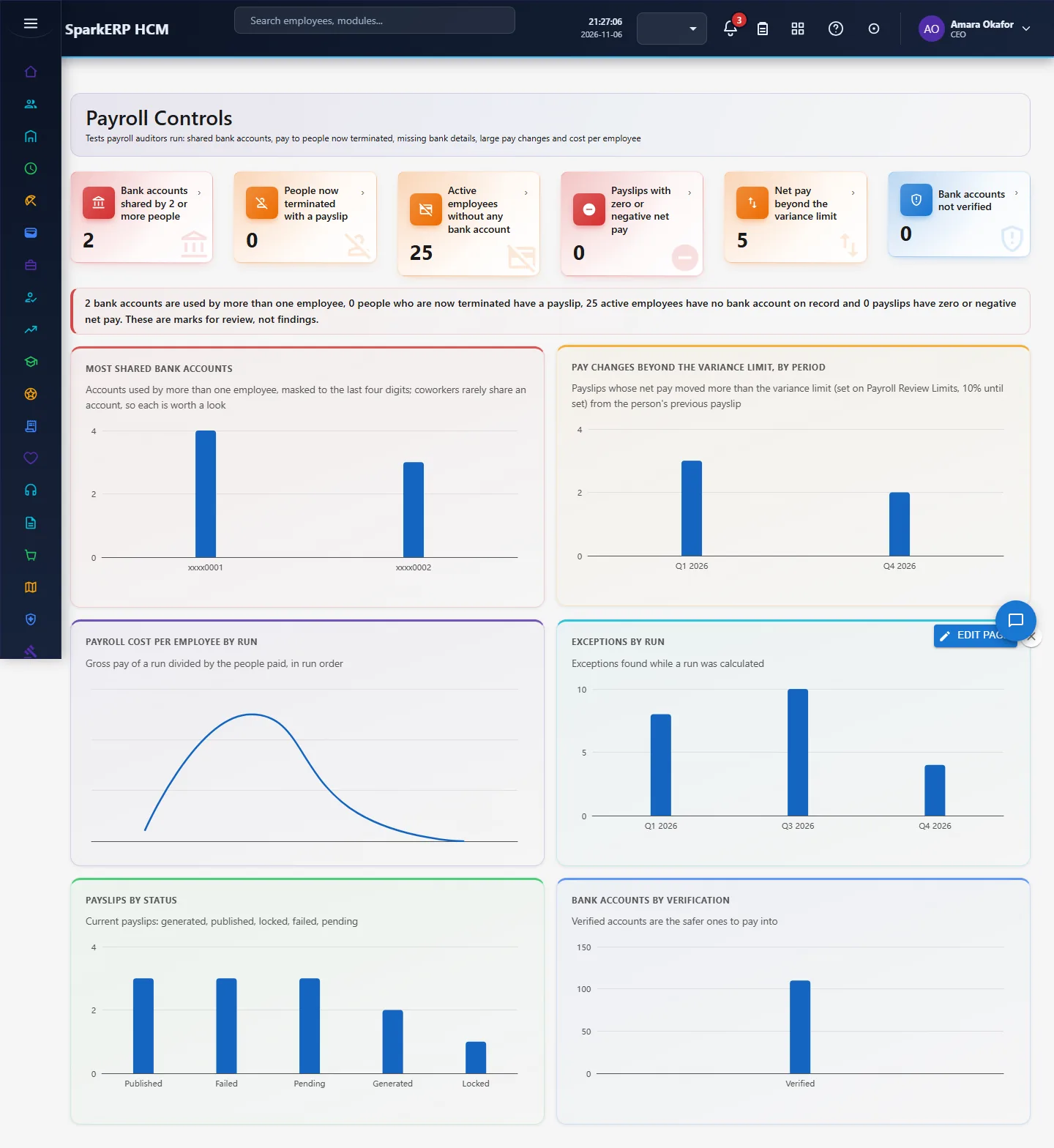
Payroll auditors run a small set of tests before they trust a payroll: is anyone being paid who should not be, do several employees share a bank account, is anyone without bank details, did pay move unusually from the last run, and how does cost per employee behave from run to run. Payroll Controls runs those tests on the records already in Payroll and Employee Information, and marks what to look at.
1. Who uses it
| Role | What they do |
|---|---|
| Payroll lead | Reads the marks before approving a run, and records what was checked. |
| Finance controller / internal audit | Uses it as the standing test of "ghost employee" and shared-account risks. |
| HR administrator | Fixes missing bank details and wrong employee status. |
2. Before you start
- Plugin:
hcm-payroll(HCM Payroll). No extra licence feature. - Access: a tenant administrator, or a login with Report.View.
- Needs: employees with their bank accounts (Employee Information), payroll runs and payslips. In a trial tenant generate the Payroll packs in Demo Data, including "Payroll controls", which adds a few employees on shared accounts so the test has something to show.
3. Set up
Nothing to switch on. The lines are: net pay is counted when it moved more than the variance limit saved on Payroll Review Limits (10% until set) from the person's previous payslip, a payslip is negative when net pay is zero or less (failed payslips are left out), and the active employees without any bank account are counted. Only accounts of employees that exist are read. Account numbers are never shown in full: only the last four digits.
3b. Change the lines: Payroll Review Limits
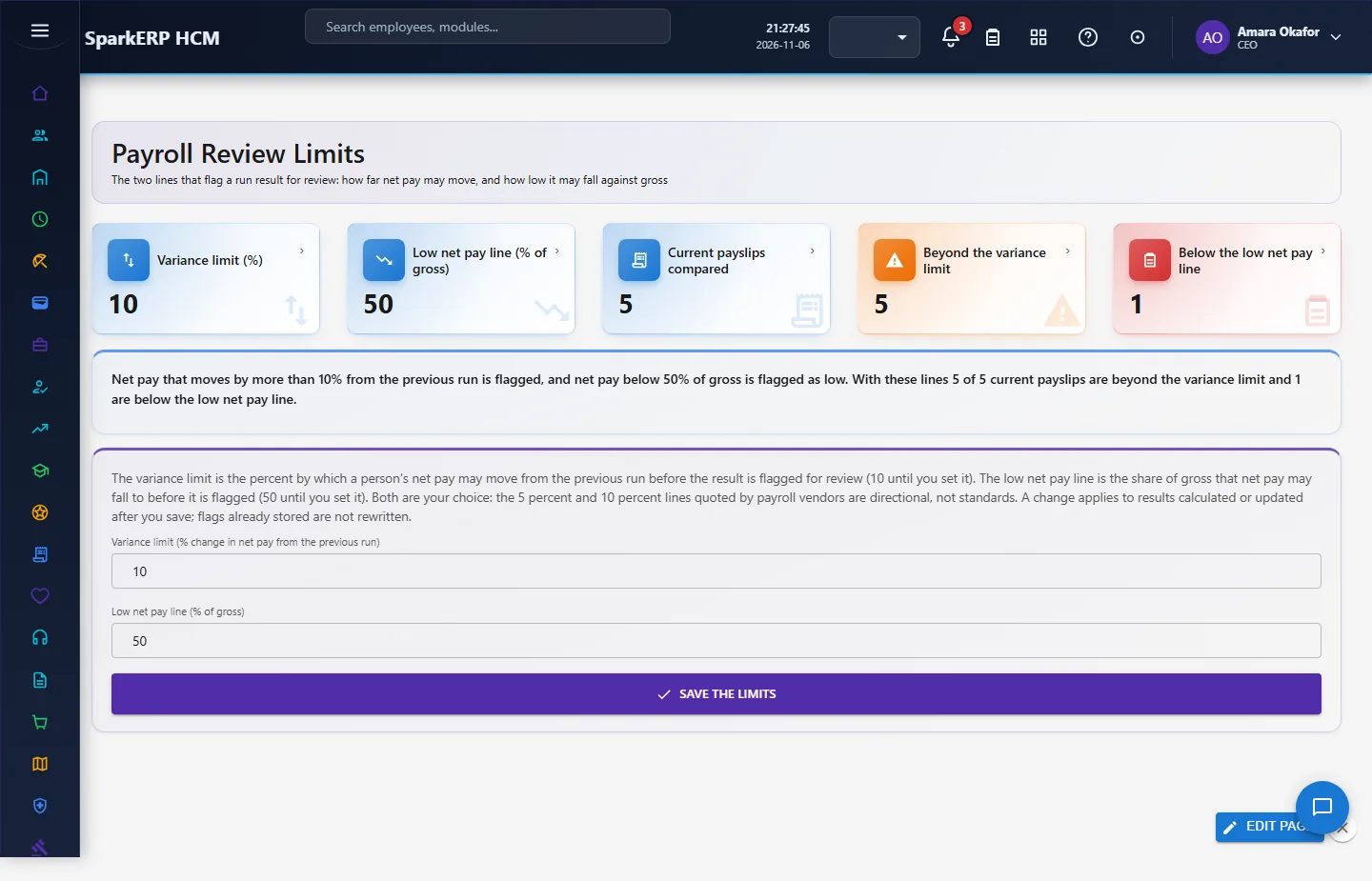
The two lines that flag a run result for review are set on Payroll Review Limits (sidebar, Payroll, Review Limits):
| Line | Meaning | Until you set it |
|---|---|---|
| Variance limit (%) | Net pay that moved by more than this percent from the person's previous run is flagged | 10 |
| Low net pay line (% of gross) | Net pay below this percent of gross is flagged as low | 50 |
Type the new values and choose Save the limits (only a tenant administrator sees the button). A value must be more than 0 and at most 100. The tiles show how many current payslips are beyond the variance limit and below the low net pay line with the saved values, so you can see what a change would flag before you choose it. A change applies to results calculated or updated after you save; flags already stored on earlier results are not rewritten. The figures quoted by payroll vendors (about 5 or 10 percent) are directional, not standards: the lines are your choice.
3c. Master-data tests: Payroll Data Checks
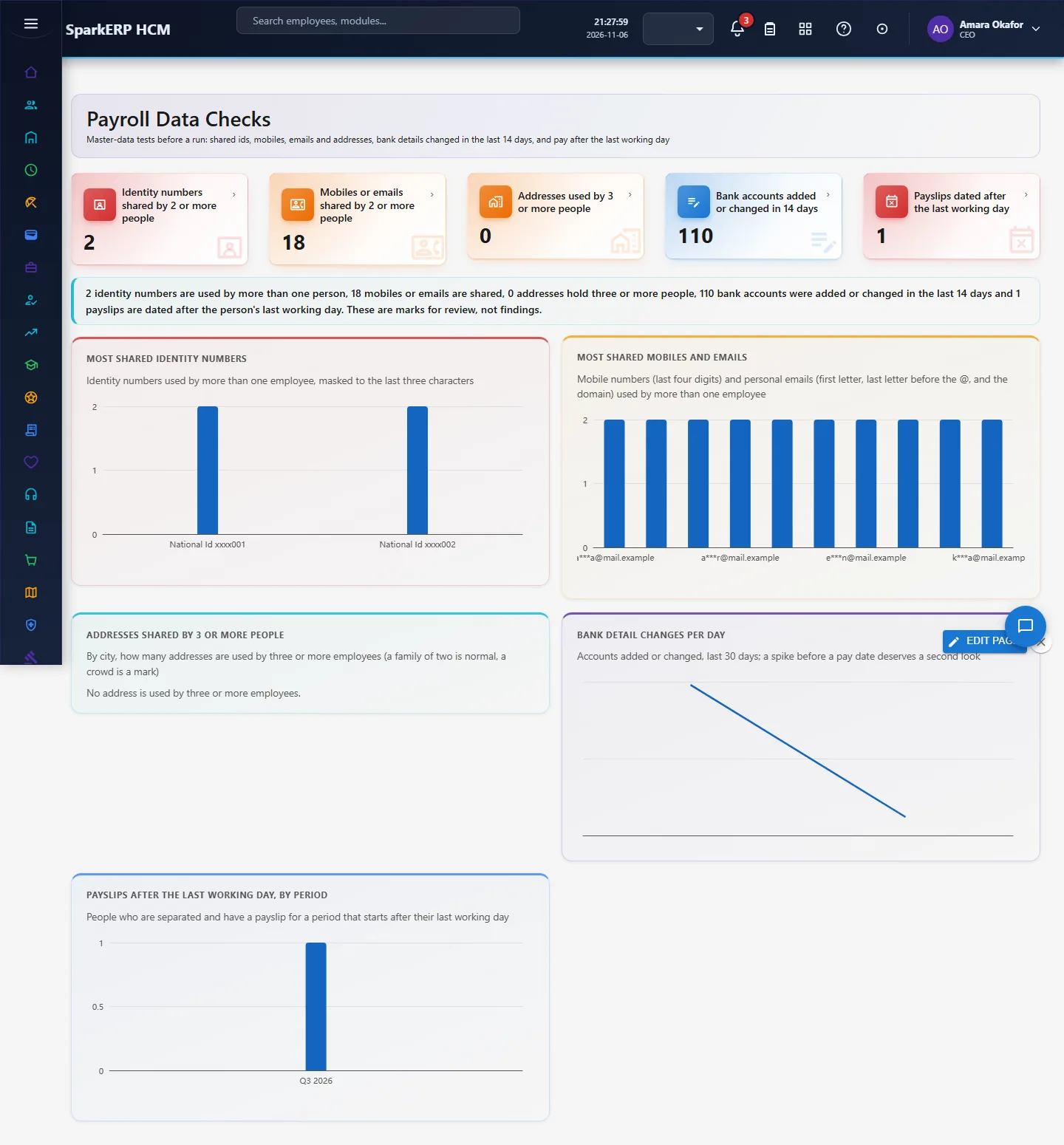
Auditors also test the data behind the pay, before a run. Payroll Data Checks (sidebar, Payroll, Payroll Data Checks) runs them:
| Test | What it marks |
|---|---|
| Identity numbers shared by 2 or more people | The same identity document type and number on more than one employee |
| Mobiles or emails shared by 2 or more people | The same personal mobile number or personal email on more than one employee |
| Addresses used by 3 or more people | The same current address line and city for three or more employees (a family of two is normal, a crowd is a mark) |
| Bank accounts added or changed in 14 days | Accounts created or updated in the last 14 days: changes just before a pay date are the classic route to a diverted payment |
| Payslips dated after the last working day | Current payslips of people whose resignation is separated, for a period that starts after their last working day (read from Separation) |
Identity numbers are shown with only their last three characters, mobiles with the last four digits, emails as the first letter, the letter before the @ and the domain. As on Payroll Controls, the tests mark records for review and prove nothing: a couple can share a mobile or an address, and a final payslip for a leaver is checked by its dates.
4. Daily use
- Open Payroll Controls in the sidebar under Payroll.
- Read the tiles: bank accounts shared by two or more people, people now terminated who have a payslip, active employees without any bank account, payslips with zero or negative net pay, net pay that moved more than 10%, and bank accounts not verified.
- Most shared bank accounts lists each shared account masked (xxxx1234) and how many employees use it. Large pay changes by period, Payroll cost per employee by run and Exceptions by run show where runs differ. Payslips by status and Bank accounts by verification show the state of the data.
- For a shared account or a terminated person, open the employee record, check, and correct or explain. Record the finding in your own audit file.
5. Charts, reports and exports
| Figure | What it counts |
|---|---|
| Bank accounts shared by 2 or more people | Distinct account numbers used by more than one employee |
| People now terminated with a payslip | Employees whose status is terminated and who have a current payslip |
| Active employees without any bank account | Active employees with no account number on record |
| Zero or negative net pay | Current payslips with net pay of zero or less, not failed |
| Net pay beyond the variance limit | Current payslips whose net change from the previous payslip is over the saved variance limit |
| Cost per employee by run | The run's cost per employee, or gross pay divided by people paid |
6. On a phone or tablet
Tiles and charts stack one per row.

7. Rules and limits
- The tests mark records for review. They do not prove fraud: coworkers can share an account (a joint account of a couple, a shared company account) and a terminated person is legitimately paid a final settlement.
- Payroll Controls counts people now terminated with a payslip and does not know the last working day; Payroll Data Checks compares each payslip period with the last working day of the separated resignation.
- Bank changes are read from the account's created and updated times (the employee record keeps no separate change history), so the page can say that an account changed and when, not what changed or who changed it.
- Duplicate ids, mobiles, emails and addresses are read on Payroll Data Checks, from Employee Information. Tax identifiers are stored masked, so they are not compared.
- Payroll Controls counts net pay moves beyond the variance limit saved on Payroll Review Limits (10% until you change it), the same line that flags a run result.
8. Troubleshooting
| Symptom | Cause and fix |
|---|---|
| Everything is zero | No payslips or accounts yet, or the demo data is not generated. |
| A shared account is a legitimate joint account | Note it in your audit file; the page keeps no "reviewed" flag. |
| "Report.View is required" | The login is not an administrator and lacks the Report view permission. |