
Appearance
Leave Outlook and Risk
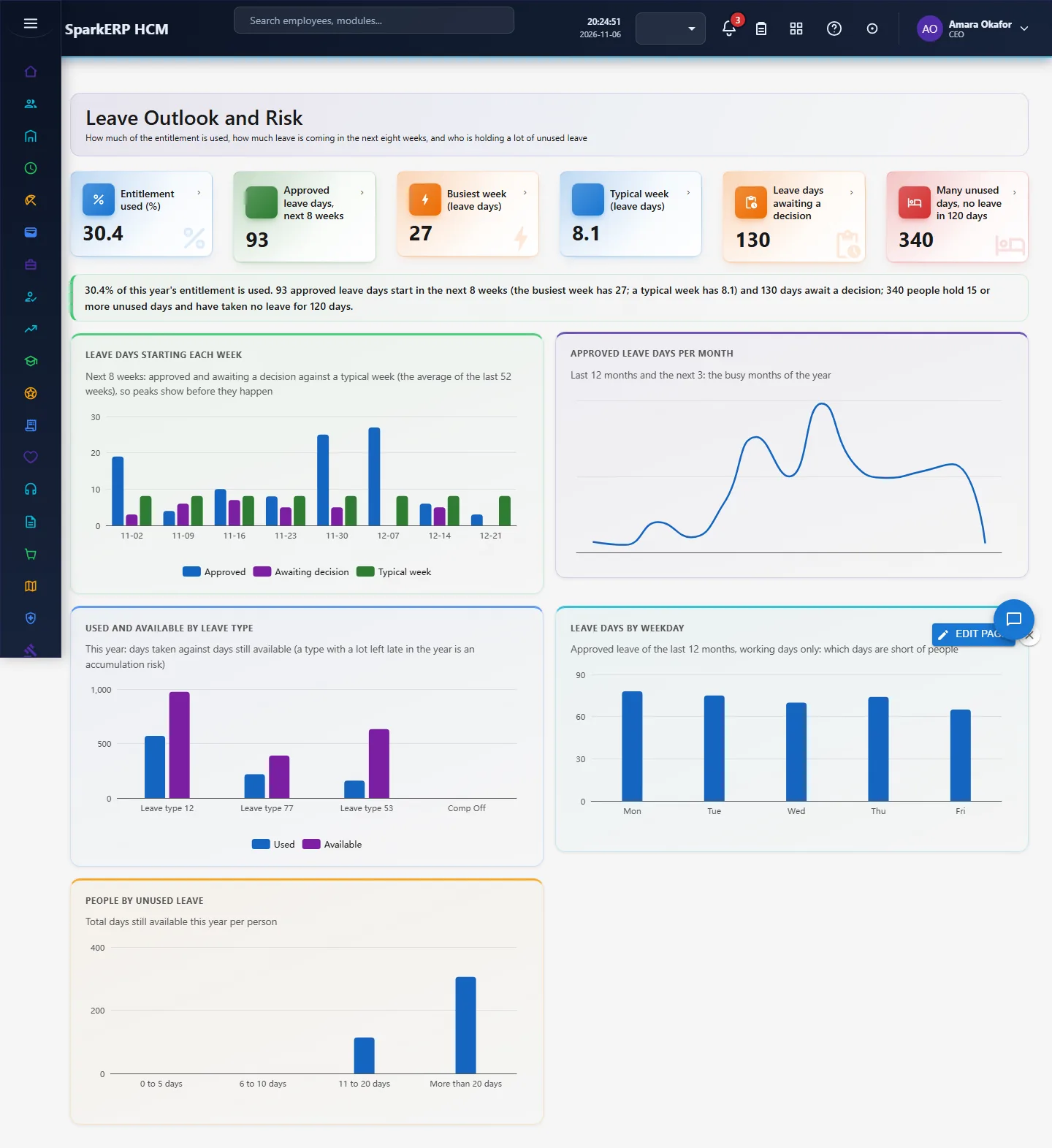
Leave tools are judged on three questions: how much of the entitlement is used (a low rate means leave is piling up), when the leave is coming (peaks and overlaps before they happen) and who is holding a lot of unused leave and has not taken any. Leave Outlook and Risk answers them from the balances and requests already in Leave Management.
1. Who uses it
| Role | What they do |
|---|---|
| HR / leave administrator | Reads utilisation and the people with large unused balances; plans reminders and carry-forward. |
| Manager / operations lead | Reads the weeks ahead before approving more leave in a busy week. |
| Finance | Reads the unused-leave bands next to the leave liability on Leave Balance. |
2. Before you start
- Plugin:
hcm-leave(HCM Leave Management). No extra licence feature. - Access: a tenant administrator, or a login with Report.View.
- Needs: leave types, policies, balances for the current year and leave requests. In a trial tenant, generate the Leave pack in Demo Data.
3. Set up
There is nothing to switch on. Two choices are fixed in the page and are worth knowing: the risk line is 15 unused days in total and 120 days without approved leave, and the outlook is the next 8 weeks.
4. Daily use
- Open Leave Outlook and Risk in the sidebar under Leave Management.
- Read the tiles: entitlement used, approved leave days in the next 8 weeks, the busiest week, leave days still awaiting a decision, and people at risk.
- Leave days starting each week shows approved and awaiting-decision leave side by side: a tall bar means a week to check before approving more.
- Leave days by weekday shows which weekdays are short of people; Approved leave days per month shows the busy months of the year.
- Used and available by leave type shows which types are not being taken; People by unused leave groups people by the days they still hold.
- For people at risk, send a reminder or plan the leave with their manager; use Leave Requests to approve what is waiting.
5. Charts, reports and exports
| Figure | What it counts |
|---|---|
| Entitlement used (%) | Days used divided by the entitlement of this year, all leave types |
| Approved leave days, next 8 weeks | Approved requests that start in the next 56 days (the whole request counts in the week it starts) |
| Busiest week | The largest number of approved leave days starting in one week of the next 8 |
| Leave days awaiting a decision | Requests waiting for the manager |
| Many unused days, no leave in 120 days | People with 15 or more unused days in total and no approved leave in the last 120 days |
6. On a phone or tablet
Tiles and charts stack one per row.

7. Rules and limits
- The outlook is the leave already booked, not a statistical forecast: it does not guess leave that nobody has requested.
- A request is counted in the week it starts, even when it runs into the next week.
- Utilisation is not compared with a target: published benchmarks differ, so read it against your own history.
- Public holidays and weekends inside a request are not removed again here; the days are the total days of each request.
- The 15-day and 120-day lines are fixed; a different line would be a settings change.
8. Troubleshooting
| Symptom | Cause and fix |
|---|---|
| Everything is zero | No balances or requests for this year; run the accrual or generate the demo pack. |
| "Report.View is required" | The login is not an administrator and lacks the Report view permission. |
| A person is missing from the risk count | They took approved leave in the last 120 days, or their unused days are below 15. |