
Appearance
Industry pack: Banking and Financial Services
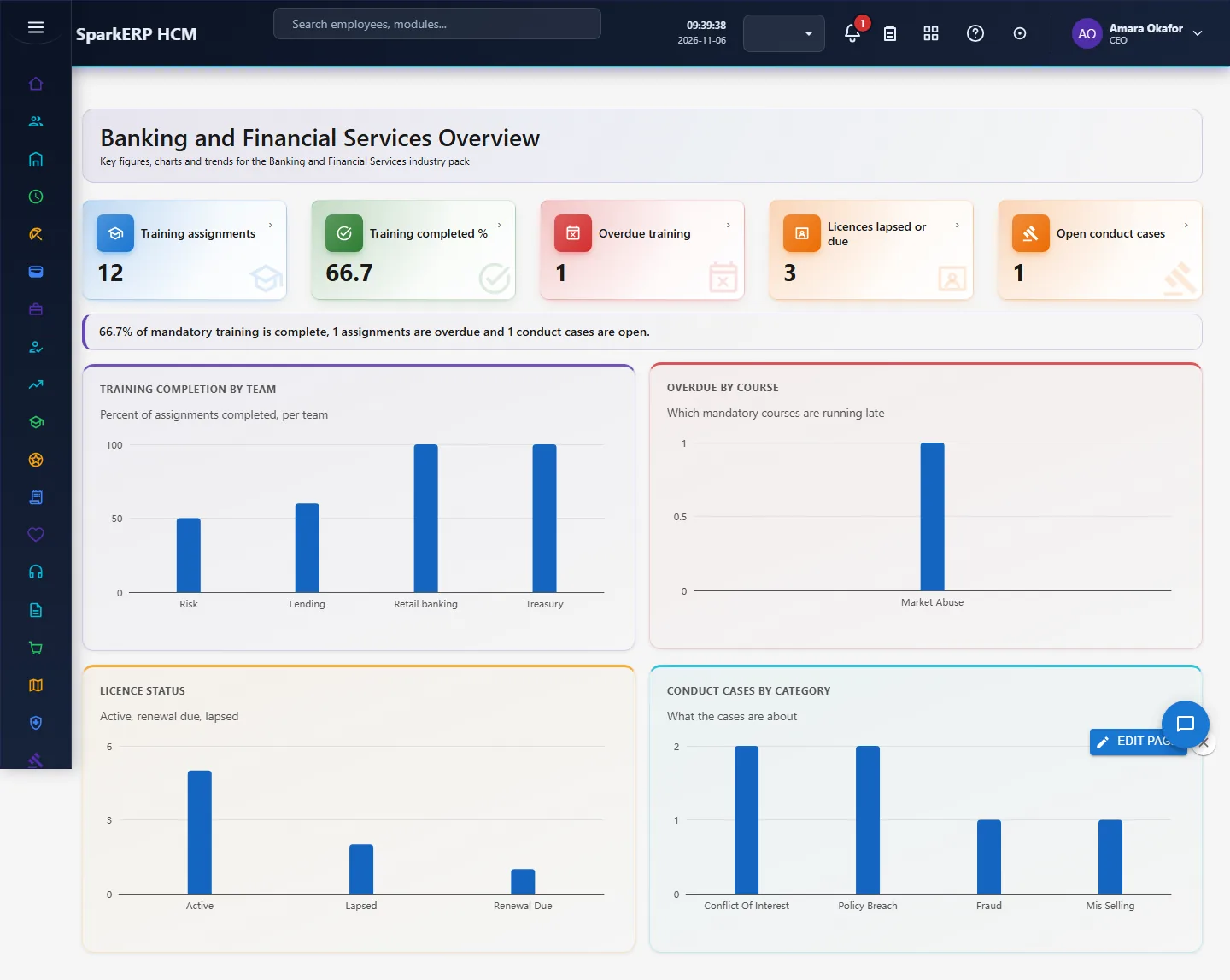
Banking and Financial Services adds what a banking and financial services organisation needs on top of HCM Core: regulatory training, professional licence, attestation, conduct case. Every screen carries charts, and the Overview answers the questions this industry asks first. It works with the people already in HCM Core and Employee; it changes nothing there.
1. Who uses it
| Role | What they do |
|---|---|
| Compliance officer | Tracks mandatory regulatory training and licences and reads the compliance rate. |
| Branch / operations manager | Watches who is licensed to advise and how teams hit their targets. |
| HR business partner | Records conduct cases and attestation status. |
2. Before you start
- Installed plugin:
hcm-industry-banking-financial-services(free tier; needs HCM Foundation and Employee). No licence feature has to be granted. - Access: tenant administrators can use every screen; the Overview needs a tenant administrator or Report.View.
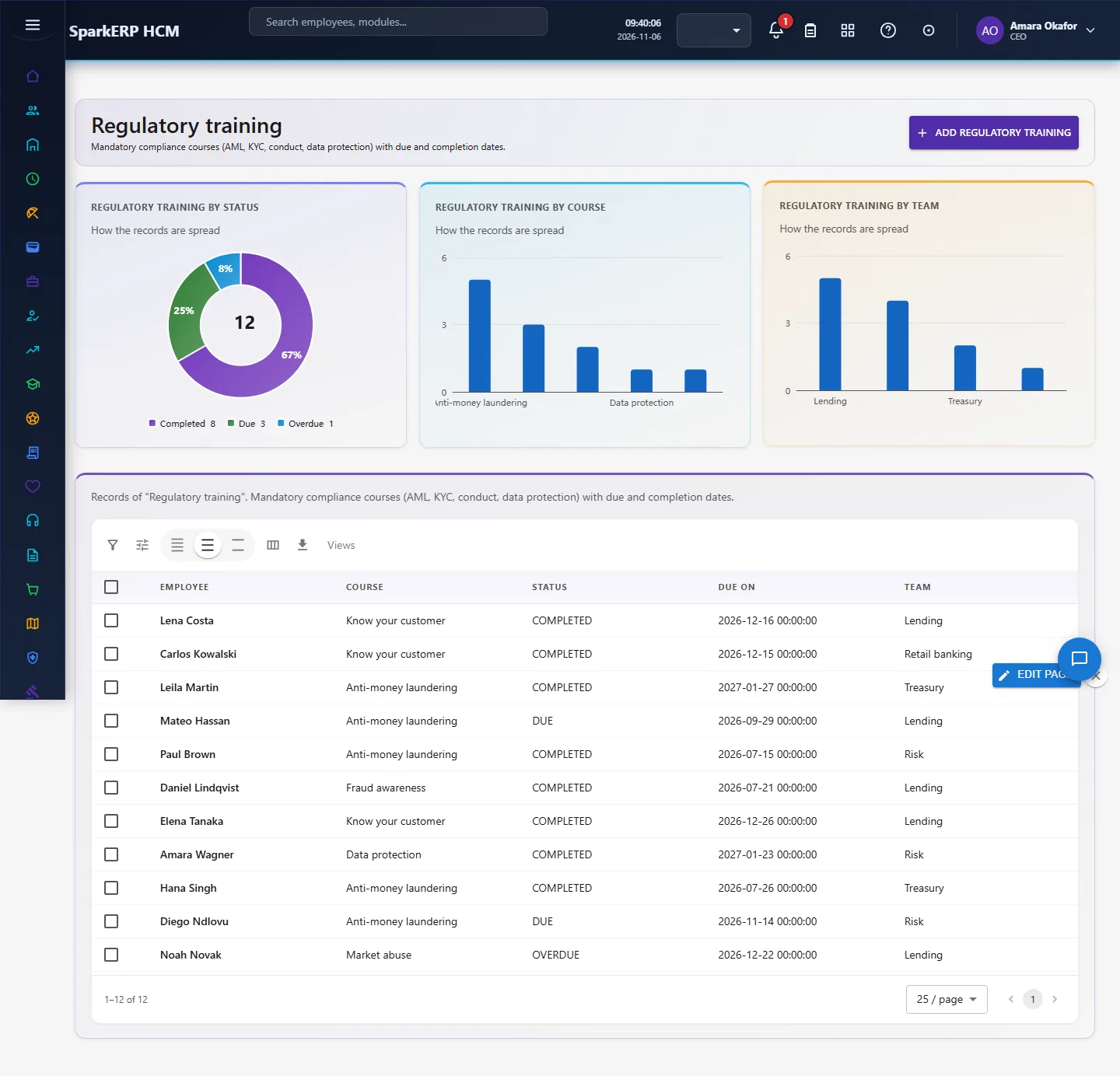
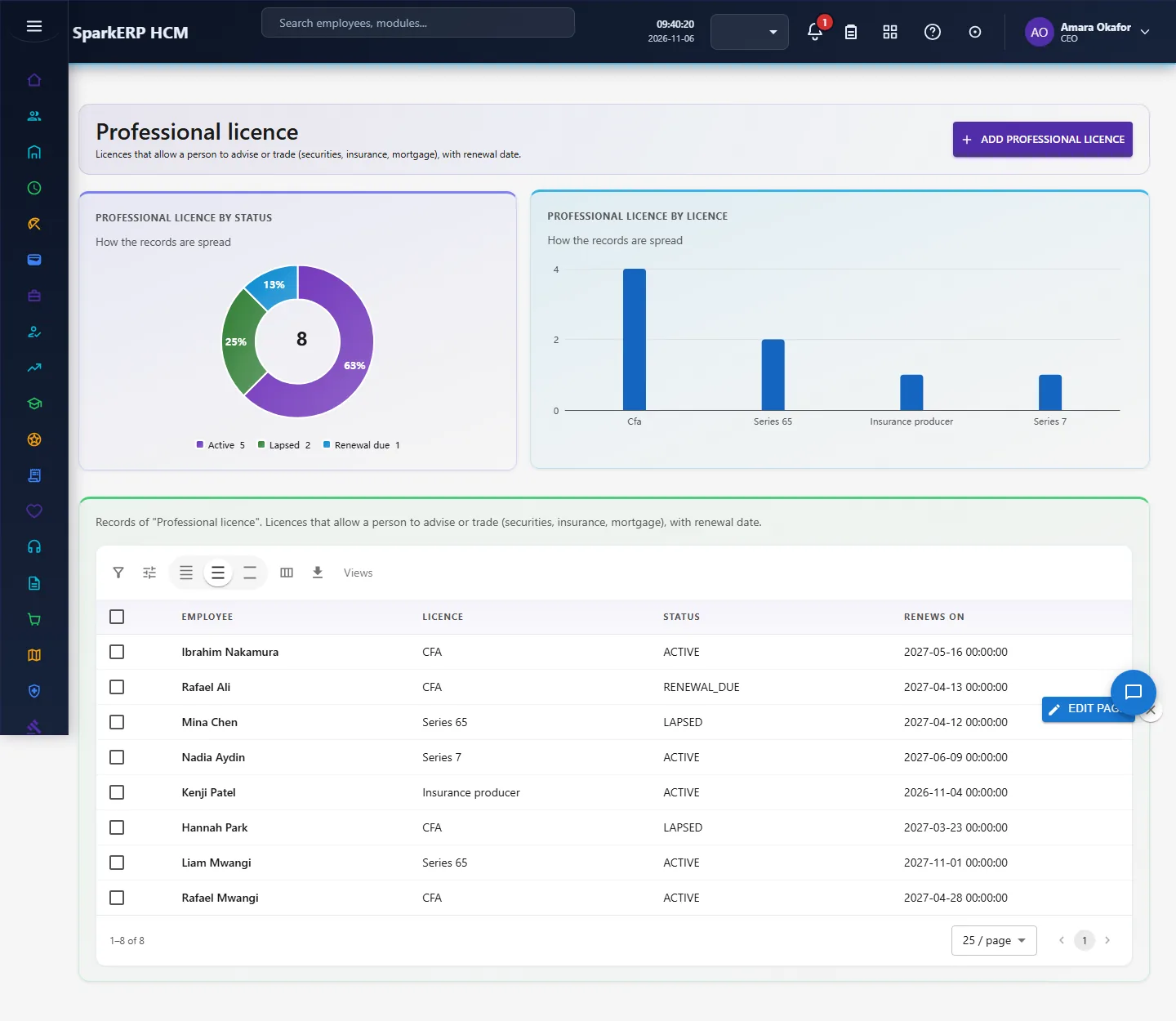
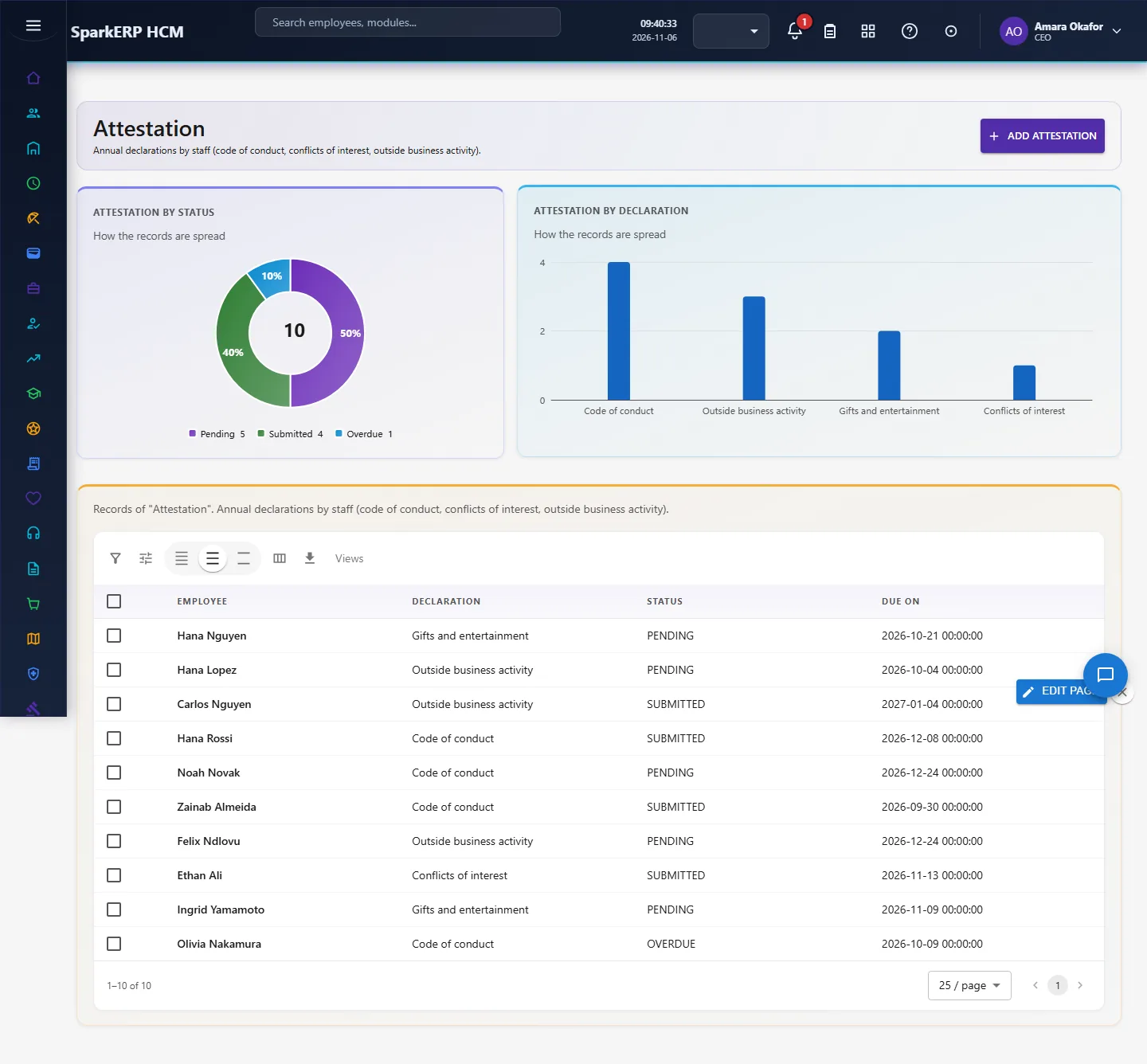
- Trial data: in a trial tenant, generate the Banking and Financial Services industry pack in Demo Data: 12 regulatory training, 8 professional licence, 10 attestation, 6 conduct case.
3. Set up
- Open Regulatory Training and record each person's mandatory courses (AML, KYC, conduct, data protection) with due dates.
- Open Licences and add securities, insurance or advisor licences with their renewal dates.
- Record annual Attestations (code of conduct, conflicts of interest).
- Record Conduct Cases raised and their outcome.
4. Daily use
4.1 Regulatory training
Mandatory compliance courses (AML, KYC, conduct, data protection) with due and completion dates. Open Regulatory training in the sidebar under Industry Pack, Banking and Financial Services. Choose Add regulatory training to add a record, click a row to change or delete it. The fields are: employee, course, status, due on, team.
4.2 Professional licence
Licences that allow a person to advise or trade (securities, insurance, mortgage), with renewal date. Open Professional licence in the sidebar under Industry Pack, Banking and Financial Services. Choose Add professional licence to add a record, click a row to change or delete it. The fields are: employee, licence, status, renews on.
4.3 Attestation
Annual declarations by staff (code of conduct, conflicts of interest, outside business activity). Open Attestation in the sidebar under Industry Pack, Banking and Financial Services. Choose Add attestation to add a record, click a row to change or delete it. The fields are: employee, declaration, status, due on.
4.4 Conduct case
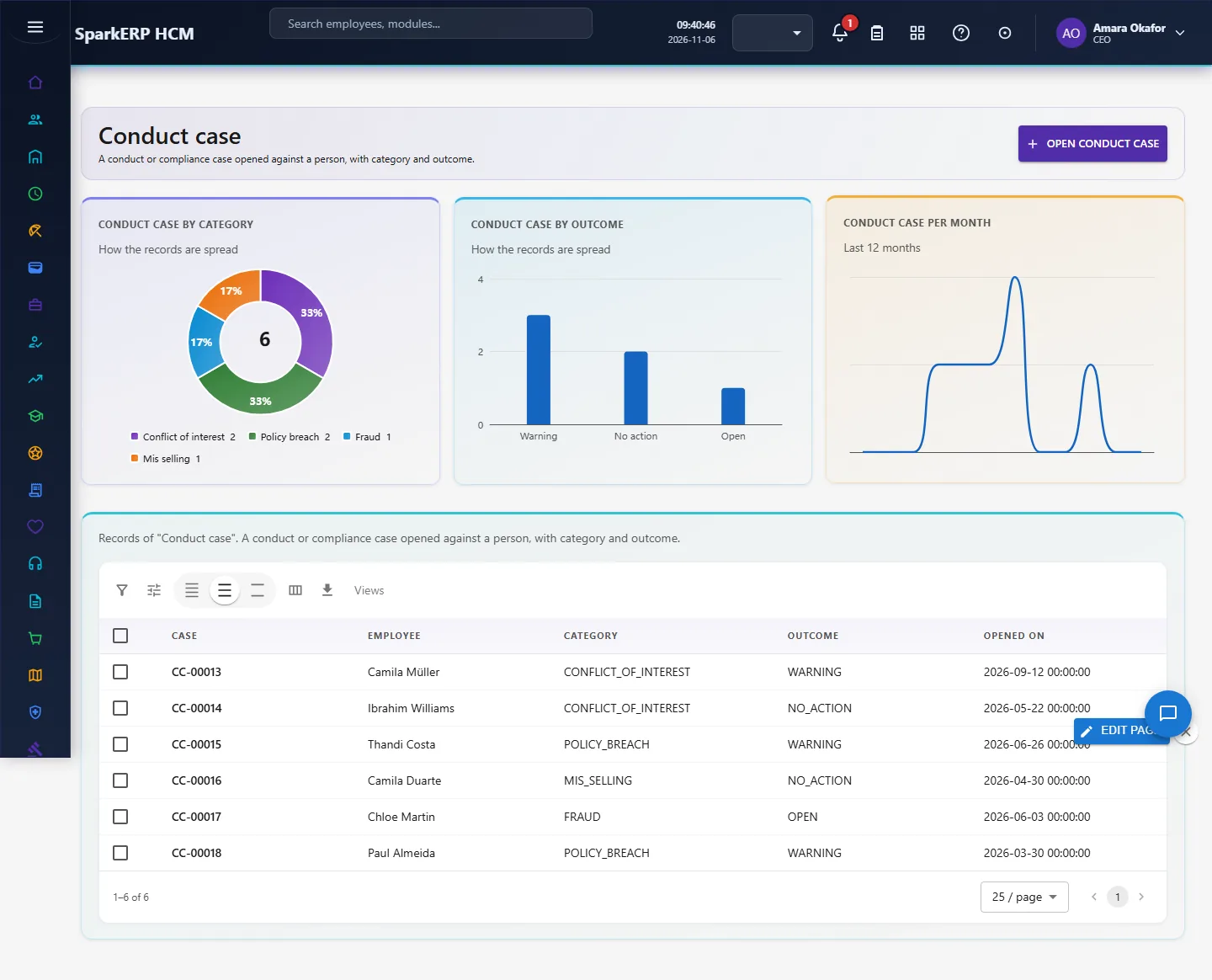
A conduct or compliance case opened against a person, with category and outcome. Open Conduct case in the sidebar under Industry Pack, Banking and Financial Services. Choose Open conduct case to add a record, click a row to change or delete it. The fields are: case, employee, category, outcome, opened on.
5. Charts, reports and exports
| Figure | What it counts |
|---|---|
| Training assignments | |
| Training completed % | |
| Overdue training | |
| Licences lapsed or due | |
| Open conduct cases | |
| Training completion by team | Percent of assignments completed, per team |
| Overdue by course | Which mandatory courses are running late |
| Licence status | Active, renewal due, lapsed |
| Conduct cases by category | What the cases are about |
Every list page also has charts of its own records (by status or category, and a trend), and the platform grid offers search, paging, column choice and export.
6. On a phone or tablet
Every screen works on a phone: tiles, charts and lists stack one per row, and the add and edit dialogs fit the screen.

7. Rules and limits
- Regulations differ by country (for example FCA, SEC/FINRA, RBI); the pack stores your records and dates but does not encode any regulator's rules.
- Conduct cases hold category and outcome only: keep investigation detail in your case management system.
- The figures are only as good as the records entered. Benchmarks differ between sources, so none is hard-coded as a target: read the figures against your own history.
8. Troubleshooting
| Symptom | Cause and fix |
|---|---|
| A chart says "Nothing to show yet" | No records yet, or none with the date or category the chart needs. Add records or generate the demo pack. |
| The Overview says forbidden | Your login is not a tenant administrator and lacks Report.View. |
| A screen is missing from the sidebar | The plugin is not installed for this tenant. Ask a platform administrator to install hcm-industry-banking-financial-services. |